
It’s an odd truth, but the more companies study AI’s impact on business, the less confident they become. Everyone agrees AI is reshaping how teams operate, yet when leaders try to measure that change, the business case blurs.
The confusion starts with cost. Human work is easy to price: hourly rates, salaries, and benefits. AI, on the other hand, runs on tokens, credits, and API calls that don’t map cleanly to business output. That mismatch makes it hard to prove what every executive already senses: AI delivers value, even if the pricing models hide it.
The headlines promise a revolution: job shifts, productivity leaps, new forms of invention. But in reality, that transformation is unfolding unevenly. Without a shared understanding of value, AI’s financial impact remains unpredictable.
The good news? AI is getting cheaper fast. Since 2020, AI infrastructure costs have dropped by nearly 70%. What used to require a six-figure setup can now run on a $50-60 monthly plan. The tools have matured, and so has the way teams build and deploy them.
Most projects we see take 10 to 12 weeks from first idea to live deployment. That’s enough time to define the use case, train and test the agent, and integrate it into real workflows.
So, let’s break down what actually drives the cost of an AI agent project in 2025, how to budget for it, and where smart teams are cutting spend without cutting corners.
Agentic AI vs. Copilots and Chatbots: What’s the difference?
Before you start planning your AI budget, it helps to know what you’re actually paying for. “AI” covers a wide range of systems, from simple chatbots to autonomous agents, and each comes with a very different price tag.


Chatbots are the entry-level option. They follow pre-set rules and decision trees, so they’re great at handling predictable requests, such as customer support or FAQ automation. They don’t really understand language; they just match patterns and respond with scripted text. That’s why they’re fast and cheap to build.
Copilots take a step up. They act as skilled assistants that boost human performance within specific tools or workflows. GitHub Copilot helps developers write cleaner code. Microsoft Copilot for Dynamics 365 helps sales teams predict trends. These systems are smarter, they can understand context and offer guidance, but they still rely on humans to make the final call.
Then there’s Agentic AI, the next big leap. These systems use large language models, real-time data, and built-in logic to make decisions, adapt to changes, and carry out complex, multi-step tasks on their own. Over time, they even learn from experience and improve their performance.
It’s no surprise that 82% of companies plan to adopt AI agents within the next three years. They see the potential: from virtual caregivers in healthcare to autonomous logistics and finance operations that self-optimize in real time.
The AI agent cost difference comes down to complexity. Chatbots are low-cost. The copilots land in the middle. Agentic AI requires a bigger investment because it involves deeper reasoning, autonomy, and ongoing learning.
In short, you get what you pay for, and with agentic systems, what you’re paying for is independence.
AI agent pricing models explained
- Usage-Based Pricing
Most AI platforms today follow a usage-based model, where you pay for what you use and nothing more, nothing less. It’s flexible, scalable, and easy to get started, but costs can add up faster than expected as your volume grows.

Here’s how it usually works:
1. Tokens and API Calls
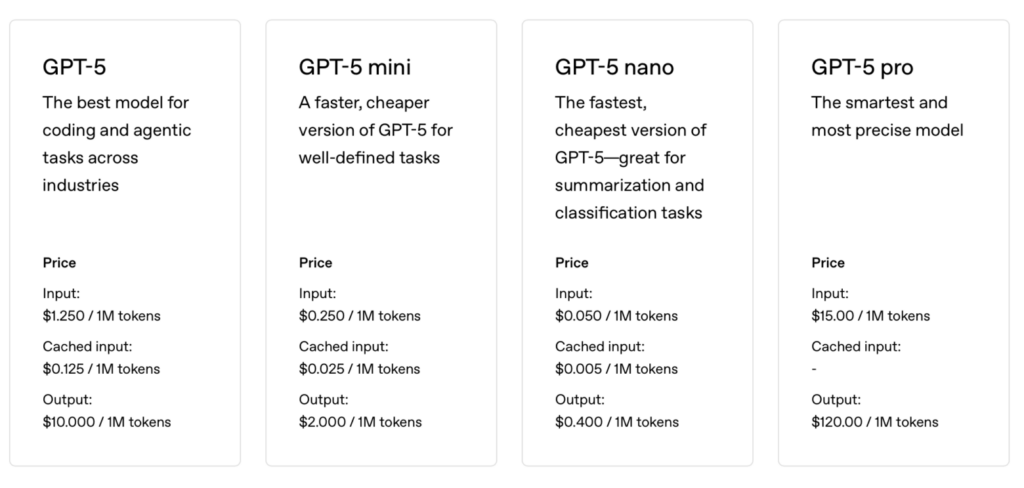
If your agent runs on large language models like ChatGPT-5 pricing depends on the number of tokens processed. OpenAI’s current rates sit around:
For example, a standard customer support chat might use between 500 and 2,000 tokens. Multiply that by thousands of daily conversations, and you’ll see why smart planning matters.
2. Messages and conversations
Platforms like Zendesk charge per conversation or message handled. Depending on how complex your setup is, prices usually range from $0.05 to $0.50 per conversation. For companies handling around 10K conversations a month, that’s about $500 to $5K in monthly costs.
3. Actions performed
Automation tools such as Zapier charge for every action they execute. Simple data transfers might cost $0.01 to $0.02 per action, while more advanced workflows, like API calls or multi-step automations, can go beyond $0.10 per operation.
The upside of usage-based pricing is clear: it scales with your business. You only pay for what’s running. The trade-off is unpredictability because when activity spikes, so does your bill. For fast-growing companies, it’s smart to track usage closely and set clear thresholds before deploying at scale.
- Subscription tiers
If you prefer predictable costs, subscription-based pricing might be a better fit. You pay a flat monthly fee based on your usage tier, and each tier unlocks more features and higher limits.
Here’s how it usually breaks down:
Starter Tier ($0–$50/month)
This is where most small teams begin. You get around 1K–5K interactions per month, basic integrations, and access to community support. It’s a good option for testing AI automation without major commitment. Expect simple chatbots, standard templates, and light analytics, just enough to prove value.
Professional Tier ($50–$500/month)
Mid-level plans handle 10K–50K interactions and add more flexibility. You’ll often get custom workflows, CRM integrations, API access, and priority support. This tier fits companies that already use AI in daily operations and want more control over how it connects to their systems.
Enterprise Tier ($500+/month)
Designed for scale. These plans usually support 100K+ interactions, include dedicated support, SLA guarantees, and advanced security features. Enterprises also get options like on-premise deployments and dedicated account management for full oversight.
Most providers also offer 10–20% annual discounts for upfront payments, which is a simple way to lower your monthly spend if you’re in for the long haul.
You can spot a “bolt-on” AI system the moment you try to use it. You have to turn features on manually, switch modes, or dig through menus. It feels awkward because it wasn’t built to be intelligent but patched to look that way.
AI-native tools work differently. Take email, for example. Traditional platforms just add smart features on top. AI-native ones rebuild the experience from the ground up with intelligence running through every action, every decision, and every response.
The result is an entirely different experience: faster, smoother, and genuinely smarter.
- AI agent development costs
The cost of building an AI agent depends mostly on how you build it. There’s a wide gap between using a no-code platform and creating fully custom solutions from the ground up.
No-Code Platforms ($0–$200 setup)
No code tools like ChatGPT Builder let you build simple agents without writing code. Most setups take 2 to 10 hours and require only light configuration. Your main expense is only the ongoing monthly subscription. This option works well for small teams that need quick results and low maintenance.
Low-Code AI Agent Solutions ($1K–$10K)
These platforms still give you a head start but require some technical work — usually custom scripts, API connections, or workflow integrations. Most agencies charge $50–$150 per hour for setup, and projects can take anywhere from 20 to 100 hours, depending on complexity. It’s a practical middle ground for teams that want customization without a full engineering build.
Custom Development ($10K–$100K +)
This is the full-scale route — everything tailored to your business logic, data, and systems. Expect around $50K for backend development, $10K–$20K for interfaces, and 20–30% of the build cost per year for ongoing maintenance.
Now you own AI agent and pay for performance, the kind of system that scales with your business, not just supports it.
Maintenance is a constant factor. For custom builds, expect to spend around $500 to $5K per month on updates, tuning, and new features. It’s part of keeping your agent accurate, secure, and aligned with real-world data.
Hidden costs and what to watch for
Building an AI agent isn’t just about initial development costs or subscription fees. The real costs often show up in the background: it’s the infrastructure that keeps everything running smoothly.
Infrastructure costs
Hosting and Servers
If you’re running a self-hosted setup, plan your budget for basic servers. Cloud providers like AWS, Google Cloud, or Azure charge based on compute time, storage, and bandwidth. The bigger your agent’s workload, the higher your monthly bill.
Third-party APIs
Most AI agents don’t work alone. They connect to tools such as CRMs, email services, and data enrichment platforms, and each comes with its own cost.
Expect to pay roughly $10–$100/month for CRM APIs, $20–$200/month for email tools, and $50–$500/month for data enrichment. A typical sales AI agent might rely on 3–5 integrations, adding up to $800-$900 per month to your total.
Data storage and processing
Every interaction your AI handles generates data: logs, analytics, training files, and more. That data has to live somewhere. Storage typically runs $0.02–$0.10 per GB per month, but at scale, that can mean terabytes of data and a noticeable line item on your bill.
Monitoring and analytics
As you know, the large-scale deployments need real-time monitoring to ensure performance and uptime. Tools like Datadog or custom dashboards ($500–$2,000 setup) help track speed, accuracy, and user satisfaction. These tools prevent downtime and protect customer trust.
In short, the price tag you see upfront rarely tells the whole story. The smartest teams plan for these supporting costs early, so their AI agent doesn’t surprise them later.
Human costs you shouldn’t overlook
Technology drives the AI agent, but people keep it effective. The human side of the project often accounts for almost 50% of the total investment. These costs are less visible at first but essential to long-term performance.
Training and onboarding
Even the best AI system needs skilled users. Teams usually spend 20–40 hours on training, depending on complexity. It’s not just about learning the interface, it’s about understanding how to work with the AI, not around it.
Ongoing supervision
AI agents don’t run entirely unattended, especially early on. As a rule, companies assign 1/2 to 1 full-time employee (FTE) for oversight during basic rollouts and up to 3 FTEs for complex enterprise systems. These people monitor performance, flag issues, and make sure the agent behaves as expected.
Prompt engineering and optimization
Getting great results from an AI agent isn’t a one-time task. It requires constant tuning: refining prompts, updating workflows, and testing responses. Most teams spend up to 20 hours each month on this work, handled by people who understand both the business domain and the model’s logic.
Maintenance and updates
AI platforms evolve quickly. APIs change, data shifts, and new features roll out. Keeping everything up to date typically costs 5–15% of the initial costs each year. It’s the price of reliability and performance, but cheaper than firefighting problems later.
When budgeting for an AI agent, think beyond development. The human effort behind training, supervision, and refinement is what keeps the system accurate, trusted, and worth the investment.
Integration costs: The hidden budget killer
Integrations are where many AI projects run over budget. Connecting an AI agent to your existing systems often costs more than the agent itself, not because of the technology, but because every system speaks a slightly different language.
CRM integration
Linking your AI agent with a CRM isn’t as simple as flipping a switch. It involves API development, data mapping, and extensive testing. Expect to spend $2K to $5K, depending on how customized or outdated your CRM setup is.
Custom workflow development costs
No two businesses run the same way, which means no two agents should either. Building custom workflows tailored to your processes can range from $1K to $5K for simple automations, up to $20K-30K for multi-system integrations that coordinate across tools and departments.
Security and compliance
For enterprises, this is non-negotiable. Security audits, data protection, and compliance with frameworks like GDPR, HIPAA, or SOC 2 add another $10K–$25K, plus ongoing monitoring to stay compliant. It’s a cost that protects you from much bigger ones later.
Testing and quality assurance
Rushing deployment is a shortcut to future problems. Proper testing across user types, data variations, and edge cases usually adds 20–30% to total project time and agent cost. It’s the difference between an agent that “mostly works” and one your team can actually rely on.
So, as you can see, the integration costs can easily exceed the platform fee itself. The smartest teams plan for them upfront, so their budget and timeline stay under control.
Typical ROI by use case
AI agents don’t just promise returns but deliver them. The numbers vary by use case, but most businesses see measurable impact within the first few months.
Customer support agents
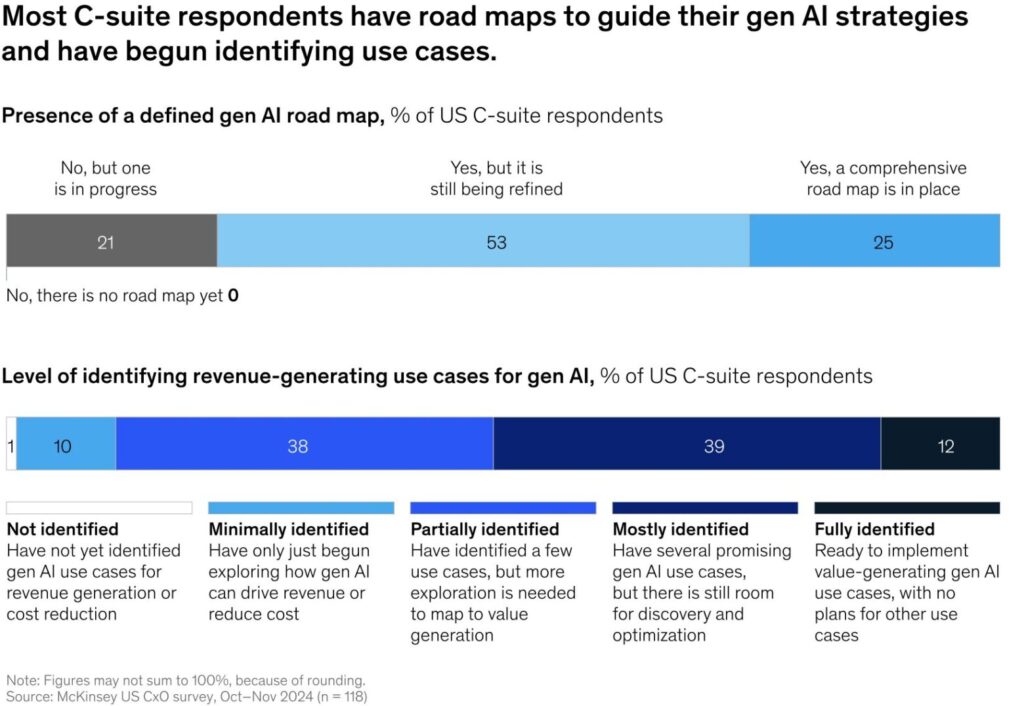
Support automation delivers the most predictable ROI. Many companies report 300–500% returns within 5-6 months, backed by McKinsey’s research showing clear gains in revenue and cost reduction.

Here’s why:
· 50–60% fewer support tickets as AI handles routine requests
· 55% faster response times, driving higher customer satisfaction
· 24/7 availability, improving retention by 25%
Sales automation agents
Sales-focused agents take a bit longer to pay off, but the gains compound fast:


· 30–40% better lead qualification accuracy
· 5x more outreach per rep with automated follow-ups
· 30% higher conversion rates through real-time personalization
Content creation agents
ROI here depends on your content volume and quality goals. Teams that publish often see major gains:


· 70–80% less time spent on writing and editing
· Consistent tone and brand voice across all materials
· 10x content output without expanding headcount
Voice AI agents
These agents often show savings right away but require close control over call volume and routing.


Typical results include:
· 80–90% lower call handling costs
· 24/7 coverage, improving satisfaction and response rates
· 60% faster call resolution, freeing up human agents for complex cases
When deployed in the right workflows, AI agents change what your team can get done in a day.
How to reduce AI agent development costs
You don’t have to overspend to build a capable AI agent. The key is knowing where to invest and where to simplify. With the right focus, you can cut costs without cutting performance.
Start with one high-impact use case
Most teams waste money trying to build all-in-one systems. A better approach is to start small: pick one process with a clear boundary and measurable outcome. This keeps your scope tight and your resources focused on what actually moves the needle.
Use open-source and pre-built components
Frameworks like TensorFlow, PyTorch, LangChain, or LlamaIndex can save weeks of work. They’re reliable, community-tested, and designed to plug into existing systems. You get full functionality without paying enterprise software prices.
Prototype before you build
Create a Minimum Viable Product (MVP) before full rollout. It’s faster to validate your idea, gather feedback, and refine early, instead of fixing expensive mistakes later. The goal is proof of value, not perfection.
Optimize token usage
If your agent uses large language models, prompting efficiency directly affects your bill. Rewriting a verbose prompt like “Generate a detailed list of startup names based on the theme of artificial intelligence” into “List startup names: theme = AI” can reduce token usage by up to 40% without losing clarity. Small changes, big savings.
Choose flexible infrastructure
Running on AWS, Azure, or Google Cloud gives you scalability without heavy upfront costs. Many teams cut infrastructure expenses by up to 75% by switching from proprietary setups to these on-demand cloud options.
Other smart ways to save:
· Use model quantization to lower compute requirements
· Deploy lightweight agents on edge devices to cut cloud fees
· Apply transfer learning instead of training from scratch
· Mix affordable models for simple tasks with premium ones for advanced reasoning
Cutting costs isn’t about doing less, it’s about doing smarter. Build for outcomes, use what already works, and evolve your system as the returns prove themselves.
The final words
The companies seeing real returns from AI agents aren’t the ones spending the most. They’re the ones treating AI as a process of constant learning, not a single project to “finish.”
They start small. A focused use case. A clear metric. Something they can measure, refine, and either scale or shut down fast. They move quickly, learn from each iteration, and apply what works. That cycle is what separates early adopters from actual winners.
This approach demands a cultural shift. It’s not just new tools; it’s a new rhythm of work. Teams have to be comfortable with testing, failing, and trying again, all while tying results directly to business outcomes. The payoff is worth it: faster insight, clearer ROI, and less waste.
That’s also why pricing matters. The total investment goes beyond development. Integration, data management, and maintenance all shape the long-term cost of ownership. Planning for these from the start prevents surprises later.
The good news: you can build smart without overspending. Focus on one high-impact use case. Leverage open-source tools. Prototype early. Optimize how your system consumes tokens and compute power. Teams that use these tactics regularly cut costs by up to 75% while maintaining high performance.
AI agents aren’t just getting cheaper, they’re getting smarter to build. The companies that plan with clarity and precision will see the fastest payback, not just in savings, but also in speed, accuracy, and decision-making power.