
Ever wished you had a virtual assistant that didn’t just follow orders but could truly think ahead, handling the repetitive tasks you dread, making smart decisions in real time, and responding like an expert?
That’s exactly what AI agents can do. They’re already automating customer queries, streamlining operations, and fine-tuning workflows in ways that quietly change how businesses run. Businesses have already admitted the impact. A Capgemini survey of more than a thousand senior executives found that 10% of major enterprises are already deploying AI agents. Another 82% plan to join them within three years, 60% in just the next twelve months. That leaves one pressing question: not if you should build an AI agent, but how to begin. And the very first step is the one most people overlook.What is an AI agent?
Before diving into how to build one, it’s worth stripping away the mystique and getting clear on what an AI agent actually is. At its core, an AI agent is a piece of software that can sense what’s going on around it, process that information, and take action to achieve a specific goal, without waiting for someone to press “go” every time. Some agents are simple, quietly automating repetitive jobs. Others are far more sophisticated, using machine learning to adapt, improve, and handle more complex decisions over time. Their uses stretch across industries:- In customer service, they power chatbots that can resolve issues without human hand-holding.
- In healthcare, they sift through medical records, schedule appointments, and even remind patients when to take medication.
- In finance, they track market signals, execute trades, and optimise portfolios.
Types of AI agents
AI agents aren’t stamped from the same mould. Their abilities range from lightning-fast rule followers to adaptive systems that keep learning long after they’re deployed. If you understand these categories, you will be able to choose the right foundation for the problem you’re trying to solve.Reactive agents – Quick but forgetful
These are the simplest AI agents. They don’t remember the past, they don’t adapt, and they don’t learn. Instead, they respond instantly to what’s in front of them, following predefined rules without hesitation. The upside? They’re fast, predictable, and efficient, which is perfect for clear-cut, repetitive tasks. Examples:- Spam filters that flag emails based on a fixed set of keywords.
- Basic game NPCs that always respond the same way to player actions.
- Motion sensors that trigger alarms the moment they detect movement.
Limited memory agents – Short-term learners
Here, the agent remembers just enough to make slightly better decisions in the moment. It might store data from the last few interactions or seconds, using that to refine its next move, but the memory is temporary. This category covers a wide range of modern AI, where a balance between adaptability and speed is very important. Examples:- Chatbots that keep track of a conversation until the session ends.
- Self-driving cars that use the last few seconds of sensor data to predict traffic behaviour.
- Customer support systems that respond to recent queries without a long-term history.
Goal-based agents – Thinking ahead
These agents can evaluate possible actions and choose the one most likely to achieve a specific goal. They don’t just look at what’s happened but simulate what might happen next. This ability to reason about outcomes makes them invaluable in strategic or planning-heavy contexts. Examples:- AI chess engines like AlphaZero that simulate countless moves ahead.
- Navigation apps that calculate multiple routes before recommending one.
- Robo-advisors that weigh investment strategies for maximum return.
Learning agents – Always improving
The most advanced of the lot, learning agents are built to act on your behalf. They remember, adapt, and get better with every piece of data they encounter. Using techniques like reinforcement learning, they refine their behaviour over time and sometimes in ways their creators didn’t explicitly anticipate. Examples:- Netflix’s recommendation engine that personalises content over months or years.
- AI assistants like Siri or Google Assistant that adapt to your habits.
- Robots that improve walking, gripping, and navigation through continuous practice.
Two main approaches to own AI agent
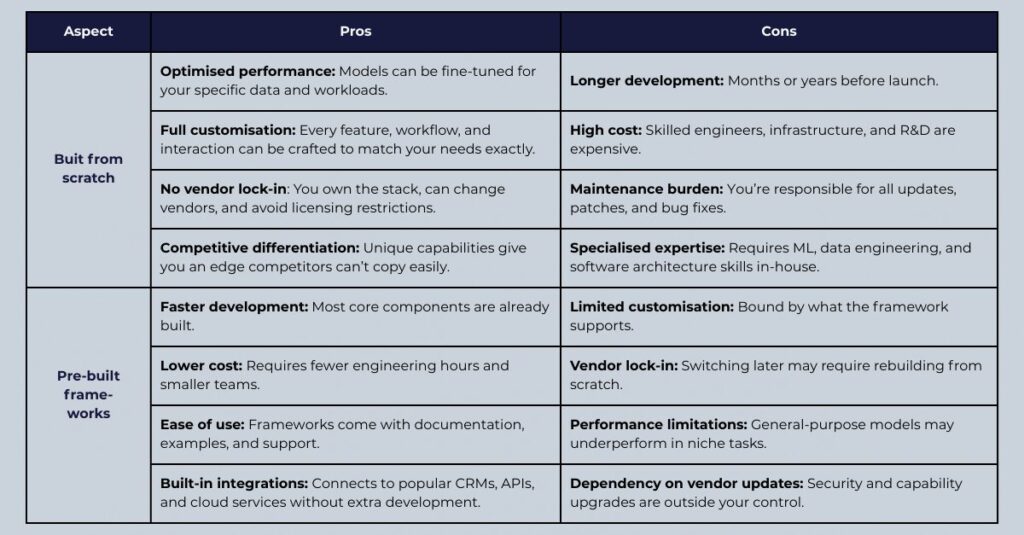
When you decide to build an AI agent, you’re faced with an early fork in the road: do you craft it entirely from scratch, or do you build on top of an existing framework? This choice shapes not only your development path but also the time, budget, and flexibility you’ll have later on.Building AI agent from scratch – Total control at a cost
Starting with a blank slate gives you the freedom to design every element of the agent to fit your exact needs. If your business requires highly specialised behaviour or you’re aiming for something that doesn’t exist yet, this route ensures no compromises. But that freedom has a price. You’ll need deep expertise in machine learning, software engineering, and possibly multiple AI subfields. The process can be slow, tiring, and subject to unexpected challenges. It works best for: Organisations with strong in-house AI talent, a healthy budget, and a problem that off-the-shelf tools simply can’t solve.Using existing frameworks – Speed and simplicity
Frameworks like Microsoft Autogen, LangChain, LlamaIndex, and crewAI offer ready-made building blocks for common AI agent functions. They handle the heavy lifting, like integrating advanced language models, so you can focus on the parts that make your agent unique. This approach drastically reduces development time and lowers the technical skills required. It’s also more cost-efficient, making it attractive for businesses that want to test the waters without committing to a massive build. It works best for: Teams with limited AI expertise, short timelines, or exploratory projects that don’t demand deep customisation.
How to build the first AI agent and where to start: 7 easy steps
Building an AI agent isn’t a sprint through a model zoo, it’s systems design under real constraints: messy data, impatient users, compliance rules, and a budget that never quite stretches.Step 1: Define the agent’s purpose and scope (the make-or-break brief)
When developing a custom AI agent, the first step is to clearly define its purpose. In other words, define exactly what you expect it to do and why it matters. This clarity from the onset will guide every decision you make later. Start by thinking about its role and responsibilities. Will your agent be sorting and categorising documents? Analysing customer conversations to detect trends? Answering support queries in real time? Or perhaps sifting through massive datasets to uncover insights? Then, narrow down your end goal. Is your main aim to speed up operations, deliver a more personalised customer experience, or take repetitive manual work off your team’s plate? Each outcome shapes the features and intelligence your agent needs. You’ll also need to decide what data fuels it. Will it pull structured entries from a CRM or database, parse messy unstructured text from emails, or rely on real-time streams from connected devices? The type and quality of your data will directly impact performance. Another key consideration is autonomy. Should the agent operate entirely on its own, making decisions and executing actions without oversight, or act more like a co-pilot, assisting a human operator who has the final say? And finally, don’t skip ethical and compliance factors. Make sure your design respects privacy laws, aligns with industry regulations, and incorporates safeguards to prevent bias or misuse.Step 2: Assemble the development team (right-sized, skill-complete)
The next step is to bring together the right people to design, develop, and train your AI agent. The skills and experience of your team will shape not only the development process but also the technologies, frameworks, and workflows you’ll use along the way. In most cases, you’ll need specialists in a few key areas:- Machine Learning Engineer to design the learning algorithms and train the AI models.
- Data Scientist to prepare, clean, and analyse the data that the agent will rely on.
- Software Engineer to handle the overall architecture, integrations, and backend logic.
- UI/UX Designer to create intuitive interfaces for users interacting with the agent.
- DevOps Engineer to manage deployment, scaling, and continuous updates.
Step 3: Gather, clean, and prepare training data
At the heart of every effective AI agent lies high-quality data. Without accurate, relevant, and balanced data, even the most advanced algorithms will struggle to perform well. Your goal is to provide your agent with inputs that truly reflect the environment it will operate in. You can source this data from several places:- Internal data, such as sales reports, customer records, transaction logs, and operational metrics already collected within your organisation.
- External data, including datasets purchased from third-party vendors, industry-specific data from specialised providers, or open datasets available online.
- User-generated data, like social media activity, online reviews, chat transcripts, and interaction logs from your digital platforms.
Step 4: Select the right AI technology and tools
At this stage, your focus shifts to choosing the right technology stack: the frameworks, tools, and infrastructure that will bring your AI agent to life. The key is to align every choice with your agent’s purpose, the type of data it will use, and the environment in which it will operate. The AI agent market landscape seems endless.

Define the functional requirements
Begin by mapping out exactly what you expect the agent to do. Will it interpret natural language, analyse images, predict outcomes, or make decisions based on patterns? Each function has its own technological needs - language understanding calls for NLP tools, while image recognition leans on computer vision frameworks.Match technologies to tasks
- Machine learning frameworks: For training and modelling, consider tried-and-true options like TensorFlow, PyTorch, or scikit-learn. The right choice depends on your team’s familiarity and the complexity of the model.
- Natural language processing (NLP): For agents that read, write, or converse in human language, explore libraries such as spaCy, NLTK, or Hugging Face Transformers.
- Computer vision: If your AI needs to “see,” tools like OpenCV or Keras with pre-trained models can jumpstart development.
Decide where the agent will live
- On-premise: Offers control and security but requires more infrastructure management.
- Cloud platforms (AWS, Google Cloud, Azure): Provide scalability and faster deployment, but can raise questions about data privacy.
- Edge computing: Useful for time-sensitive applications where processing must happen close to the source, think IoT devices or autonomous systems.
Equip your team with supporting tools
- IDEs: Pick an environment that makes coding, debugging, and testing efficient.
- Data storage and pipeline management: Solutions like MongoDB or Apache Kafka can keep data organised and flowing smoothly.
Step 5: Design the agent (architecture, memory, and decisions)
With your objectives and technology stack in place, the next step is to design the blueprint of your AI agent, which is the underlying system that determines how it operates, interacts, and grows.Choose the agent’s architecture
Think of architecture as the skeleton and nervous system of your AI. It dictates both how the agent is organised and how it responds to tasks.- Modular design: Break the agent into independent components, each responsible for a specific function, then integrate them. This makes it easier to update, troubleshoot, and scale without disrupting the whole system.
- Concurrent design: Build the agent to perform multiple tasks in parallel. This is especially important for scenarios that demand speed, like handling several customer conversations at once or processing real-time sensor data.
Define its core capabilities
- Pinpoint the must-have abilities like data ingestion, processing, decision-making, and output generation. Examples could include generating recommendations, flagging anomalies, or routing customer requests.
- Decide how people (or other systems) will communicate with the agent: through a chatbot, a web interface, or APIs that accept structured commands.
- Embed a feedback mechanism so the agent can adapt and refine its behaviour over time, especially if using reinforcement learning.
Map the flow of data
- Identify the data formats and sources, plus any preprocessing steps needed to make that data usable.
- Outline the sequence of transformations and computations your AI will perform.
- Define the formats and channels for results, whether that’s a visual dashboard, a text response, or direct action within another system.
Shape the decision-making framework
- Select models and algorithms suited to the agent’s responsibilities, from lightweight decision trees to complex deep learning networks.
- For reinforcement learning agents, establish the reward structures or behavioural policies that will shape decision-making over time.
Step 6: Develop the agent
This is where your carefully built design begins to take shape as a functional system. Development involves turning architectural plans into real code, connecting it to the outside world, and ensuring it works reliably under real conditions.Implement the core features
Start by building the core capabilities defined in the design phase. If you’re following a modular architecture, create self-contained components that can be coded, tested, and updated independently, such as a natural language processing module, a decision-making engine, or a data ingestion pipeline. This approach allows you to refine each piece without risking the stability of the whole system.Integrate with external systems
Your AI agent rarely works in isolation as it needs to communicate with other tools, platforms, and data sources. That’s why it is important to link the agent to third-party APIs for additional capabilities, such as pulling customer information, fetching real-time data, or triggering actions in other systems. On top of it, don’t forget to build databases to store the agent’s operational history, user preferences, and interaction logs, ensuring it has quick access to relevant information when making decisions.Embed learning and memory
A truly capable AI agent can adapt and remember things. So, equip your agent with the ability to recall past interactions or context. This could mean using relational databases, graph databases, or in-memory systems to make future responses more personalised and relevant.Test relentlessly
Even the smartest AI is only as good as its reliability. Testing ensures your agent behaves as intended and doesn’t collapse under pressure.- Verify that each module operates correctly in isolation.
- Check how modules interact—does the chatbot interface correctly relay inputs to the decision-making logic? Are the outputs accurate and timely?
- Simulate real-world loads and edge cases to measure responsiveness, accuracy, and stability.
Step 7: Launch and keep watching
Once your AI agent has passed development and testing, it’s time to send it into the wild. But the move from a controlled lab environment to real-world use needs to be handled with care.Rehearse before the premiere
Before your agent faces actual users, place it in a staging environment, a setup that closely mirrors your production systems. Here, you can stress-test it under conditions that resemble live usage without risking your actual operations. This step helps uncover edge cases, integration quirks, and performance bottlenecks that may have gone unnoticed in earlier testing.Deploy gradually
Avoid the “big switch” moment. Instead, use staged deployment methods such as:- Blue-green deployment: Run two identical environments, one with the old system, one with the new, and switch traffic between them once the new agent proves stable.
- Canary releases: Introduce the AI agent to a small fraction of your user base first. Monitor how it performs, then expand access in stages.
- Incremental rollouts: Deploy features one at a time rather than pushing the full system all at once.
Keep a constant pulse on performance
Deployment isn’t the end, it’s the start of the real learning phase. Continuous monitoring is much needed to ensure your AI agent stays reliable and effective. Track key metrics such as:- Response times. Is the agent delivering answers quickly enough?
- Accuracy rates. Are predictions or recommendations still hitting the mark?
- User satisfaction. Do people trust and enjoy interacting with it?
Adapt and grow
User feedback is gold, so collect it and act on it. Regular updates will keep your AI tool relevant, patch vulnerabilities, and improve its decision-making capabilities. As your business or environment changes, your agent’s knowledge base and algorithms should evolve too.How long does it take to build an AI agent?
The development timeline for an AI agent can range from just a few hours to several months, depending on the project’s complexity, available expertise, and the chosen development method.- Basic AI agents, such as simple chatbots built with pre-existing templates, can be set up in a matter of days or weeks.
- Advanced, fully customised AI agents, especially those requiring massive datasets, unique algorithms, or integrations with complex systems, can take months or more, from the initial planning phase to full-scale deployment.