
Most people hear “AI agents” and “MCP” in the same sentence and assume they’re interchangeable. But they’re not. They solve different problems, and once you see the difference, the whole thing becomes easier to navigate.
Agents make decisions, take action, and own pieces of a workflow the same way a capable teammate would. They can follow instructions, respond to changes, and coordinate with other agents. When you give them a job, they carry it through.
Model Context Protocol, on the other hand, is the wiring behind the scenes. It gives models a predictable way to access tools, data, and systems without custom glue code every time. It doesn’t “think" and it doesn’t “decide.” It simply keeps everything connected so the agent can do its job without tripping over missing context or outdated information.
You end up with two layers working together:
• Agents that execute real tasks.
• MCP that supplies the structure and context they rely on.
What is an AI agent?
An AI agent is a piece of software that takes work off someone’s plate. It doesn’t wait for a long list of instructions. It handles tasks on its own, learns from the feedback, and gets better the more it’s used.
The point is to give teams more time for the work that actually needs human judgment. When an agent runs a process end-to-end or even just handles the parts that people usually repeat all day, the entire workflow speeds up.
A simple example: At Altamira, we use an agent that sets up new employees. It pulls data from HR and directory systems, provisions access, and does the onboarding steps hiring managers usually chase by hand. One less back-and-forth, one smoother first day.
And that’s one use case. Agents can:
-
Resolve common support issues before they reach a human
-
Answer employee questions without creating another ticket
-
Draft sales proposals based on real customer data
-
Coordinate tasks across tools so teams aren’t juggling systems
Once you have a reliable agent in place, it becomes a steady part of how work gets done, not another tool people forget about.


What is Model Context Protocol?
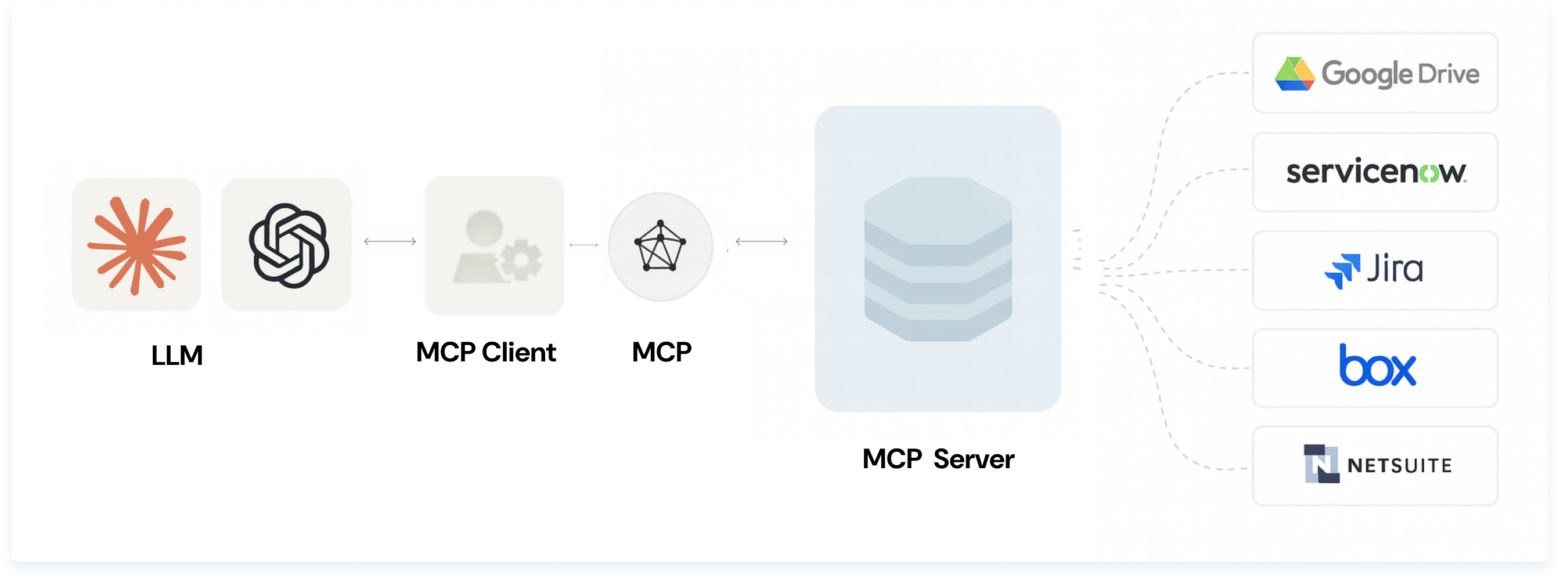
MCP is a protocol created by Anthropic that gives AI systems a predictable way to interact with third-party software. It doesn’t make decisions or run workflows. It simply provides the bridge.
Explore more: Model context protocol: a new standard for AI integration
Here’s how it works.
A Model Context Protocol server exposes a set of tools: each one tied to a specific function inside another system. A “List projects” tool, for example, might map directly to the GET /projects endpoint of a project management app. The server tells the AI, “Here are the actions you’re allowed to take.”
On the other side, an MCP client, often an AI agent, chooses which tools to call based on what the user wants and what the server makes available. It only works within those boundaries, which keeps things easier to monitor.
Because the protocol has taken off quickly, you can now find Model Context Protocol servers for hundreds of systems. For example, GitHub offers an MCP server that lets agents read and update issues or pull information from repos without custom integrations.
The result is simple: MCP gives agents the structure they need to work safely across different systems.

What are MCP use cases?
Model Context Protocol has caught on quickly because it gives different tools far more reach than they were initially built for. With the right mix of MCP servers, almost any MCP-enabled app can act as an “everything app” without custom integrations.
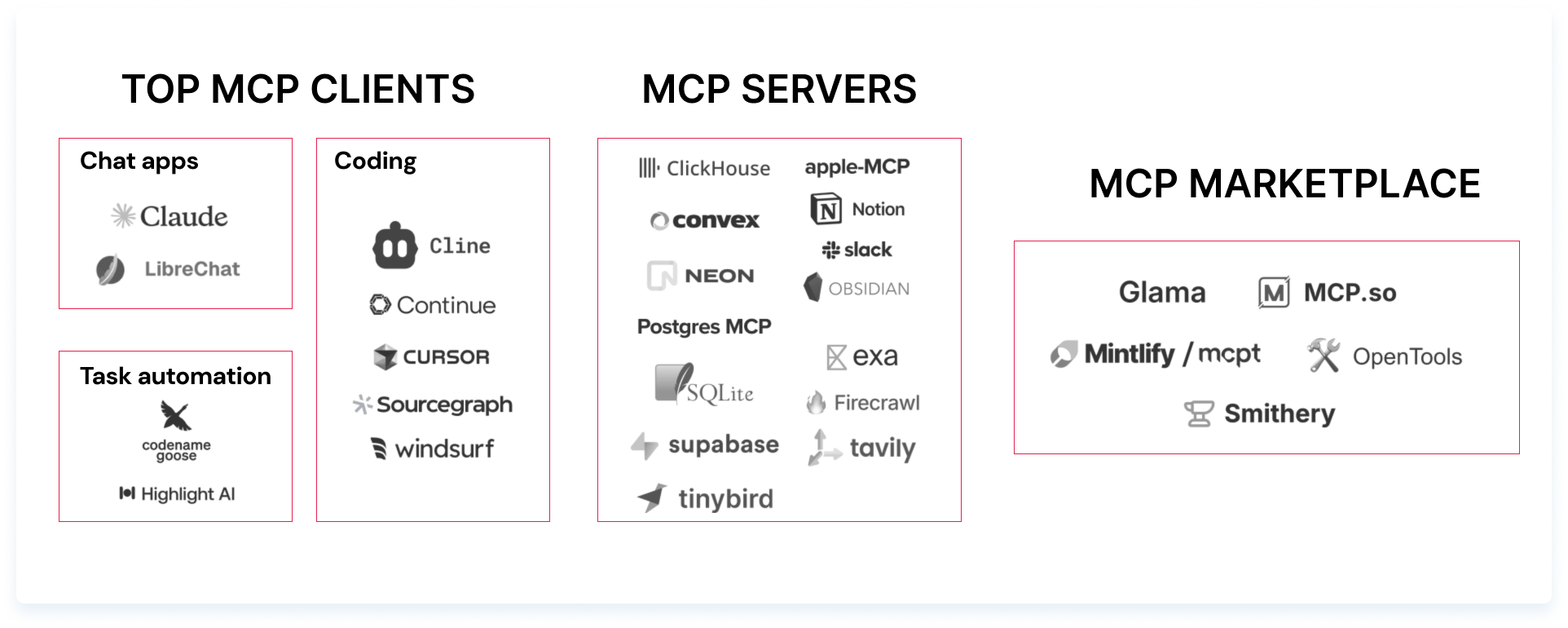
Cursor is the brightest example. It’s a code editor at its core, but as an MCP client, it can take on a lot more.
-
Add the Slack MCP server, and it becomes a lightweight Slack client
-
Add the Resend server, and it can send email
-
Add the Replicate server, and it can generate images on demand
Things get more interesting when users combine servers. You may ask Cursor to generate a front-end layout, then call an image-generation server to create a hero image for the page, and all inside the same workflow.
Most of the activity around MCP today falls into two buckets:
-
Developer-heavy, local-first workflows where people want their editor or local app to reach into multiple systems
-
New LLM-driven experiences where AI clients need structured access to a range of third-party tools
Both are early signs of how Model Context Protocol is becoming the connective tissue that lets AI systems plug into the software people already use.

Dev-centric workflows
Developers like staying in their editor. The moment they switch between available tools, context slips and momentum slows. MCP fits neatly into that reality. It lets developers bring outside systems into their IDE instead of jumping between tabs all day.
For example, an agent inside Cursor can pull logs, inspect behavior, and report back without forcing the developer to leave their workflow.
MCP also opens a new door that wasn’t previously available: providing coding agents with accurate, dynamic context with almost no setup. A developer can generate an MCP server straight from documentation or an existing API, and the agent immediately knows how to call those functions.
As a result, developers spend less time wiring things together and more time using the tools, whether they’re pulling real-time data, running commands, or extending an AI assistant’s abilities on the fly.
Net-new experiences
MCP isn’t only for developers, even though technical users were the first to adopt it. Tools like Claude Desktop are starting to bring MCP into everyday workflows for people who never touch an IDE. It’s a natural next step: once non-technical users can call structured tools through a simple interface, the range of use cases widens fast.
We’re already seeing the early signs. Dedicated MCP clients will likely emerge for customer support, marketing, design, and image creation: areas where users want AI to work inside familiar tools without extra setup.
Blender’s MCP server is a good example. People who barely know the tool can now describe the 3D model they want, and the agent handles the rest. Similar patterns are emerging for Unity and Unreal. Text-to-3D is happening in real time as the community builds more servers.
At the same time, infrastructure is catching up, too.
-
Mintlify and Stainless are reducing the work required to generate MCP-ready servers
-
Cloudflare and Smithery are helping teams deploy and scale them
-
Platforms like Toolbase are starting to smooth out key management and proxying for local-first setups
As the ecosystem matures, we’ll see new clients, new workflows, and a much broader set of people using MCP-powered tools, often without realizing that MCP is what’s making the experience feel simple.
MCP servers vs AI agents
Model Context Protocol and AI agents often get talked about together, but they play very different roles. MCP is only a protocol. It's a way for an AI system to reach into third-party applications and use the tools those apps expose. It doesn’t act, decide, or run a workflow. It just opens the door.
AI agents do the actual work. They interpret prompts, make decisions, and carry out tasks across apps, data sources, and internal systems. When an agent needs real-time information or needs to take an action inside another product, Model Context Protocol gives it a structured way to do that.
It’s a one-way relationship. Agents benefit from the Model Context Protocol because it gives them clean, reliable access to tools. But agents don’t change how Model Context Protocol servers behave. Only the teams that build those servers can extend or update them.
The simplest way to see it:
-
MCP expands what an agent can access.
-
The agent decides what to do with that access.
Each layer has a different job, and keeping that distinction clear makes it easier to design systems that scale.
The final word
Agents and MCP aren’t abstract ideas anymore. They’re shaping how people and teams will use AI in real work, not someday, but right now.
Agents are the part you feel directly. They take on full tasks, move work forward, and reduce the amount of time you spend on repetitive steps. Whether you’re managing a team or juggling your own workload, an agent can handle the pieces that usually slow you down.
MCP plays a different role. It gives those agents reliable access to the tools and data they need. Instead of building custom integrations or wiring up APIs by hand, MCP servers keep everything connected in a way that’s easier to maintain and far more predictable.
Together, they create a simple pattern:
-
Agents take action
-
MCP keeps the systems in sync
If you build software, this means less effort spent stitching systems together and more time spent delivering features. If you lead a team, it means work that runs faster with fewer handoffs.
And if you’re just exploring what AI can do, it means tool usage that feels more helpful and less fragile.
When you interact with an AI system, you’re often seeing both layers at work. One decides what to do. The other gives it the reach to do it. Understanding the split makes it easier to see what’s possible and where the next wave of progress will come from.