
For decades, software development has meant mastering a language that only machines understand. Developers have spent years learning syntax, debugging cryptic error messages, and carefully translating human needs into computer logic, line by line and function by function.
But as AI systems grow more capable, the way we work is quietly starting to change. We're no longer building software just by writing code. Instead, we’re starting to create it by simply explaining what we want: from syntax to intent, from programming to prompting.
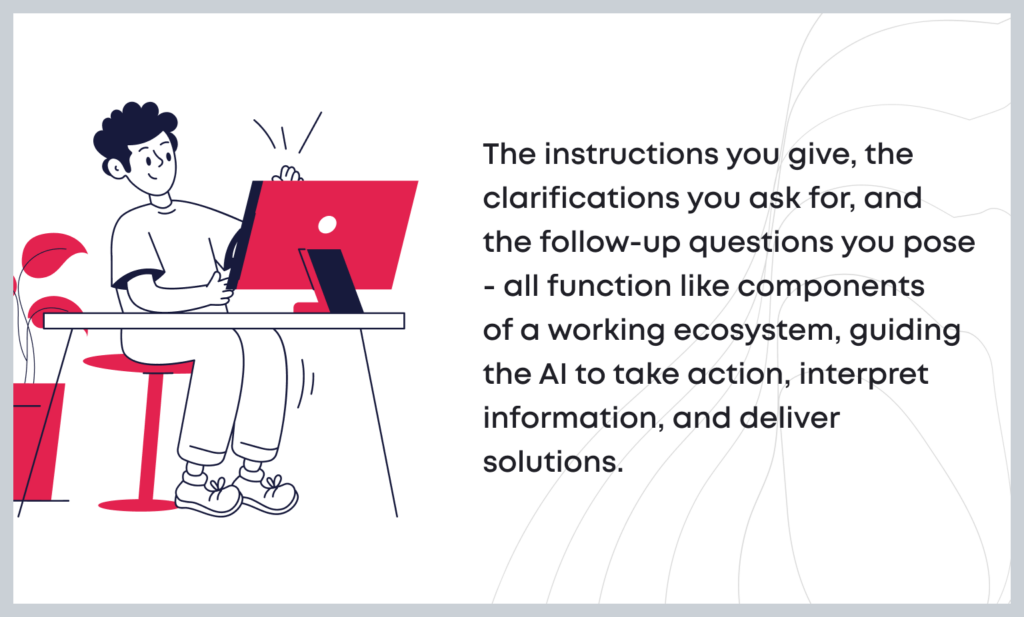
The instructions you give, the clarifications you ask for, and the follow-up questions you pose - all function like components of a working ecosystem, guiding the AI to take action, interpret information, and deliver solutions.
This is not another techie trend or a shortcut, but rather a huge change in how we think about software development: who gets to participate, how we describe problems, and how we structure collaboration between humans and machines.
The core shift: from commands to context
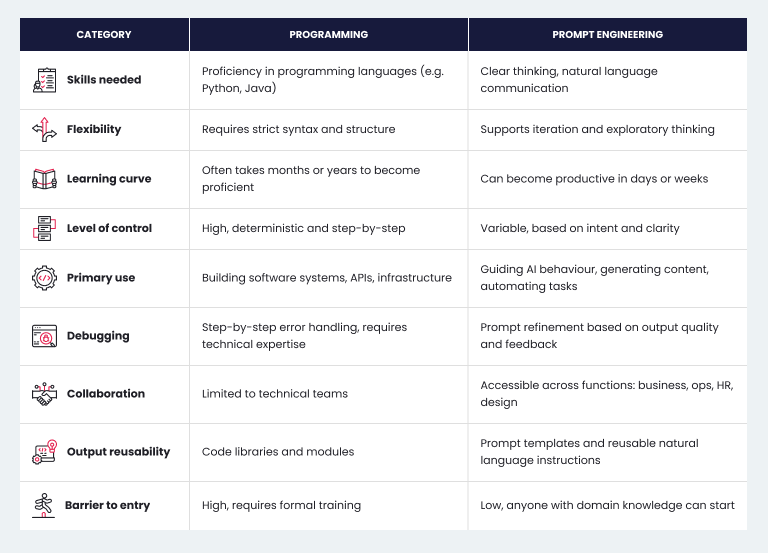
Traditional programming languages like Python or JavaScript require a high degree of precision, but in a very specific form: syntax. Every misplaced character, indentation error, and semicolon (or lack thereof) can break the entire program. You are telling the computer exactly what to do, one step at a time.
With AI-assisted software development, you're still being precise but in a different way. Precision now comes through context, structure, and clarity of intention. Instead of telling the system how to do something, you're telling it what you want to be done, and what the outcome should look like.
- “Prompt engineering is the practice of giving clear, well-structured instructions (prompts) to generative AI so it can guide generative AI models in producing desired outputs.”
- “AI-assisted programming means working alongside AI tools, especially large language models, to help with different parts of software development. That might be writing code, suggesting how to complete it, spotting bugs, or even helping plan out a project. It’s like having a smart assistant that understands code and can support you throughout the process.”
However, the way you talk to an AI makes is a big deal. An awkward request gets you something awkward back. But if you're clear about what you need, if you think through edge cases, explain the context, and set expectations, the AI has a much better shot at giving you something truly useful.
For example, compare these two prompts:
Raw prompt:
“Create a contact form for a website.”
Refined prompt:
“Design a responsive contact form for a business website. Include fields for name, email, subject, and message. Validate that all fields are filled out and that the email is in a valid format. On successful submission, display a thank-you message in place of the form. No backend needed, just frontend HTML, CSS, and Vanilla JavaScript.”
What makes the difference? Not using more words but saying the right things. As you can see, the second version anticipates edge cases, defines success, and provides enough structure for the AI to generate something usable.
What makes a good prompt?
Good prompts aren’t just random guesses; they follow clear rules that experienced software engineers already understand. It’s like those same principles are now being used in a new way, with language instead of code.
Just like a good function has a clear return type, a good prompt should define what a good result looks like. Don’t just say what to build; instead, describe how it should behave and what conditions it should meet.
❌ “Build a chatbot.”
✅ “Create a chatbot that greets the user, asks for their name, and recommends a book based on genre preference. If the user inputs something unclear, respond with a relevant clarifying question.”
Include examples
Examples do two things at once: they help explain what you want, and they set boundaries so the AI knows what to avoid. Think of them as a mini test suite baked into the prompt.
“For example, if the user enters ‘fantasy’, the bot should reply: ‘You might enjoy The Name of the Wind by Patrick Rothfuss.’”
Anticipate errors and edge cases
However, one of the most common mistakes when writing prompts is forgetting to plan for when things go off track. Just as in programming, to achieve reliable results, consider what might go wrong and how the AI should handle it.
“If the user enters a number instead of a genre, respond: ‘Please enter a genre, not a number.’”
Give context
AI systems perform better when they understand where and how something will be used. Even a short note like “This is for a mobile-first nonprofit website with a limited budget” can greatly improve the quality of the output.
Think like a prompt engineer
Writing a good prompt isn’t like writing an essay, and it’s not like writing code either. It sits somewhere in between - part clear thinking, part giving instructions, part imagining how things might play out. It’s closer to systems design: you define inputs, expectations, constraints, and behaviours. You stop thinking in loops and conditions and start thinking in scenarios and intentions.
Consider a simple request: build a product listing page. A skilled developer might break that into components, wire up a backend API, and style the UI. A skilled prompt engineer, on the other hand, might say:
“Generate a responsive product listing layout that displays product image, title, price, and a short description. Use a grid layout for desktop and a single column for mobile. Add a ‘Load More’ button at the bottom. Display placeholder images and text. No live data or styling frameworks, use pure HTML and CSS.”
This isn't just a cleaner prompt but a fully formed idea. It’s the kind of explanation you’d give a teammate: clear, focused, and built around what needs to happen and why.
Integrating prompting into development workflows
Of course, prompt engineering doesn’t replace software development, it only complements it. Here’s how teams can integrate it without compromising quality or control:
Start with prompts in early prototyping
In the idea and wireframe stage, use prompting to generate rough implementations, UI scaffolds, or sample data flows. As a result, you can speed up iteration dramatically and clarify requirements before real engineering begins.
Use prompts to extend or refactor code
Well-written prompts can help AI generate tests, add documentation, or refactor large code blocks. They can also help with porting functionality across stacks or frameworks.
“Refactor this React component to use hooks instead of a class-based structure. Ensure no functionality is lost.”
Establish prompt standards
Just like you’d set coding standards or follow design guidelines, it’s worth having team norms for writing prompts too. Use consistent language, structure, and formatting so prompting becomes something anyone can learn and repeat, not a guessing game or a one-off trick.
Treat prompts as versioned artefacts
In complex systems, prompts grow and change consistently. Store them in version control. Review them in pull requests. Track how changes to a prompt affect output over time. Eventually, you can maintain reproducibility and reduce “prompt drift.”
Who should be prompting?
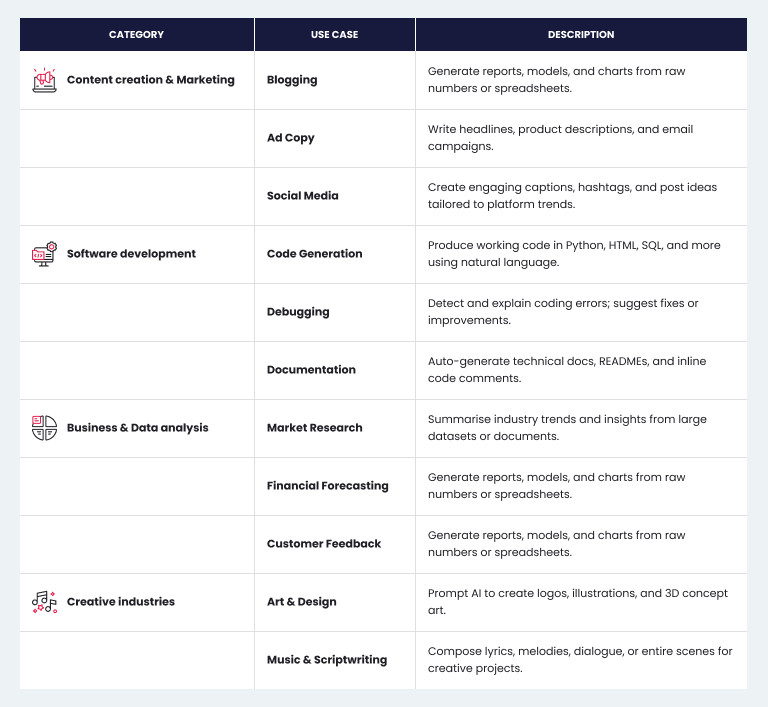
The short answer? Everyone involved in building or shaping software.
- Product managers can use prompting to quickly prototype user flows and interactions
- Designers can describe layout behaviour and have AI generate scaffolds
- QA engineers can create test cases with rich input-output examples
- Developers can offload repetitive tasks and accelerate boilerplate generation
Today, the gap between technical and non-technical roles is fading. People who can clearly explain what’s needed and describe the desired outcome are becoming some of the most valuable contributors.
Why “human” beats “fluent”
Writing good prompts isn’t rocket science. You just need to be able to express ideas clearly, anticipate what could go wrong, and define what success looks like.
This is the new software literacy: not learning to write code, but learning to communicate intentions in a structured, context-rich way that machines can act on. No worries, you’re not being less technical. You’re just being technical in a different language.
Why business leaders should be paying attention
AI-assisted programming and generative AI appear to be a major shift in how work actually gets done. And the best part? Tools like Copilot let you build what you need yourself, just by explaining it in plain language. You can create apps, automate workflows, analyse data, and solve problems using the same language you’d use in a meeting.
Here’s what that means in practice:
- Speed and scale: What used to take weeks can now be done in a few hours
- Personalisation: You’re not stuck with one-size-fits-all, your prompts reflect your data, your workflow, your way of working.
- Real-time innovation: You can try new ideas, tweak them on the fly, and share what works across your team.
Say you’re a recruiter. Instead of reading through 100 resumes manually, you ask the AI to pull out the top candidates, filtering by skills, experience, location, or even team fit. It gives you a shortlist in seconds. And if your needs change, you just update the prompt.
So, the sooner you get comfortable with it, the more you’ll be able to do, business-wide.
Creating a culture where AI becomes second nature
Although, let’s be honest: giving people access to AI tools doesn’t mean they’ll instantly know how to use them well. We need intuitive platforms to lower the barrier to entry. But more importantly, we need environments where learning, experimenting, and sharing what works are part of the everyday culture.
Remember when Excel first became a must-have at work? Over time, every department had a few go-to experts, the people who could make it do things others couldn’t. We need the same now: people who are skilled at writing effective prompts, improving AI outputs, and helping others learn by example. These “prompt champions” will be just as valuable as yesterday’s spreadsheet wizards.
What comes next
As you can see, prompting isn’t just a tech skill. It’s a new kind of fluency, a practical, teachable ability that will separate fast-moving teams from the rest.
If you treat prompting like a tool, one that needs practice, structure, and real use cases, you’ll unlock tangible value. Prompting can turn any motivated employee into someone who builds faster, thinks more creatively, and solves problems on their own.
Yes, it’s exciting and a little overwhelming. But it’s also already here. And the sooner we start building the skills and culture around it, the more ready we’ll be for what’s next.
The bottom line
Sure, everything still runs on code behind the scenes. But as AI becomes a bigger part of how we work, knowing how to talk to it, clearly, effectively, in plain language, is becoming just as important as knowing how to code.
That’s why the barrier to software development is no longer how well you know a language, but how clearly you can define a need. In that world, syntax fluency matters less. Clarity of thought matters more.
And the best developers won’t just be those who know Python inside out but those who can describe a problem like a user, think through it like a system, and tell an AI what needs to happen—step by meaningful step.
With AI tools, teams can move quickly, testing ideas and rolling out updates in days instead of weeks. That kind of speed makes it easier to adjust when the market shifts.
Projects often cost less, too, not just because development takes less time, but because cleaner, more accurate code means fewer problems after launch.
And perhaps most importantly, being able to ship better products faster gives you a real edge.
Speak human. Machines understand it now.
Wonder how AI capabilities may empower your business? Join our free AI discovery workshop! Contact us to get more information.