
AI-powered tools can be a real lifesaver, almost every business recognises this. It might even give ideas to make something similar, but embedded into your company’s workflow.
If that’s you, the next question is — how can you create your own AI? Some might think it’s a nearly impossible task, especially if you’re not an enterprise with limitless resources.
The reality, however, is very different.
When it makes sense to build your own AI
Almost every business has to deal with some form of data on a regular basis. Making sense of it takes a long time for humans, but not for AI.
AI can analyse, process, and generate data insights faster than any human. This technology is behind pretty much every chatbot, recommendation engine, and most importantly, automation.
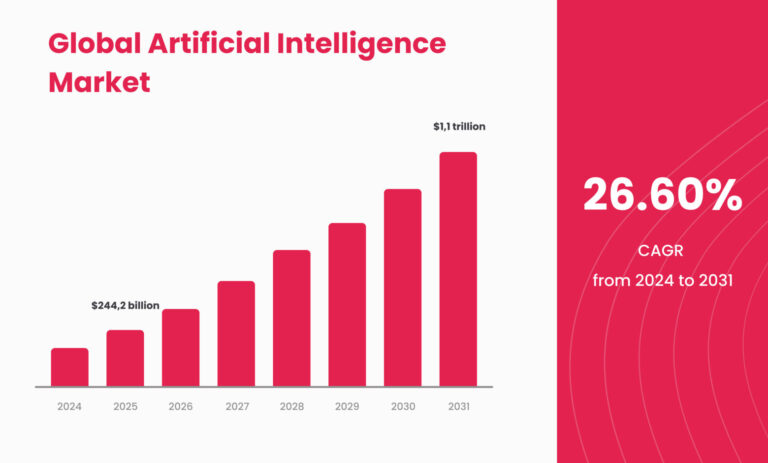
Seeing the success of some off-the-shelf AI-powered tools might give businesses the idea to create something similar in-house. According to Statista, the AI market is projected to reach $244.22 billion by the end of 2025. Based on the current annual growth rate (CAGR) of 26.6%, it is expected to reach $1.01 trillion by 2031.
On paper, making your own AI sounds reasonable, but is it feasible?
See also: How can customers reduce risks when implementing AI
When off-the-shelf tools are enough
With so many AI-powered tools available, the ultimate question for any business is this: How to make your own AI? Should I use pre-made tools or build something in-house?
The answer heavily depends on your goals. Understanding the strong sides and shortcomings of both options will give you the answer.
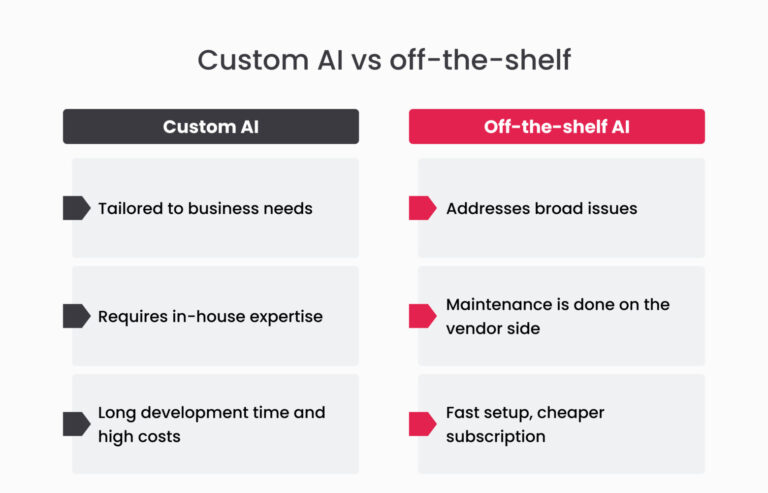
Off-the-shelf AI models are pre-built tools that usually address the most common tasks, such as customer service or data analysis. Their main appeal is in how easy they are to get started with, but this convenience comes with limitations: they are designed to address the broad issues, not the specific needs a business might have.
When a custom system creates an advantage
Custom AI models are built specifically for a business’s needs. Their biggest appeal is that they fully align with the business’s workflows and goals. The drawback, however, is the high requirements, such as having in-house expertise, access to high-quality data, and ongoing maintenance costs.
See also: Uncovering the truth: common myths about AI
Knowing the idea behind both custom and off-the-shelf AI, how do you choose which one suits you better when you build your own AI? Ask yourself three questions:
- How much are you willing to spend on AI? Off-the-shelf models are always cheaper than building one from scratch.
- What tasks do you want AI to do? Specific business needs might not be addressed on the market, making custom solutions the only option.
- How much time do you have? Needless to say, off-the-shelf models are faster to deploy compared to custom-built ones.

Natalia Semak, Altamira’s Chief Delivery Officer, summarises the difference.
The problem you have may not match what off-the-shelf models were trained for.
While there are many powerful models available (like OpenAI’s GPT or Anthropic’s Claude), they are general-purpose and may not have specific knowledge about the processes, terminology, or nuances of your organisation. As a result, they might not perform well without significant fine-tuning or customisation.
Building your own AI model is challenging and done best with a reliable partner on your side. Successful AI adoption lies in finding a knowledgeable partner who follows best practices and can consult you at any time.
A reliable partner brings confidence, and, as the saying goes, confidence is a key to success.
Building AI is not about going through the list and checking off the boxes. The AI development process might vary depending on your goals, limitations, and budgets. The outline, however, always consists of these main stages.
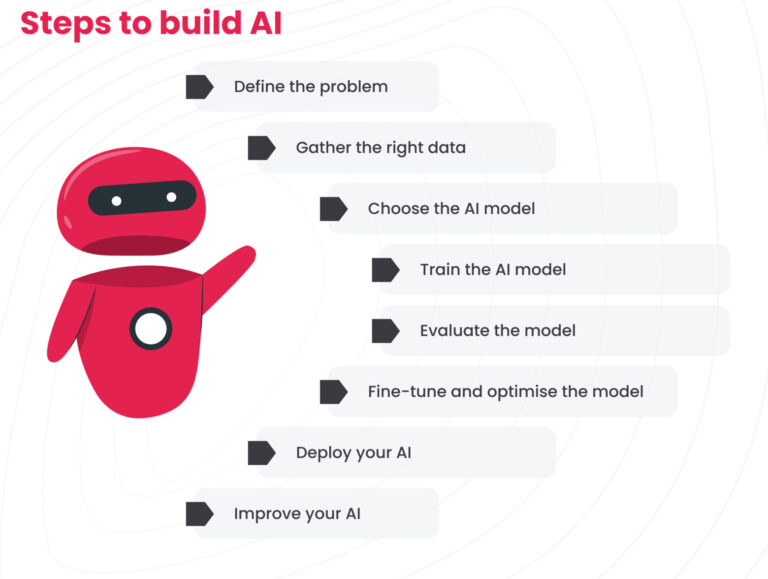
Step 1: Define one business problem clearly
Before building any software, you need to know its purpose. The same goes for AI: what do you want the model to do? Building an AI-powered recommendation engine will widely differ from a customer support chatbot.
Knowing what you want the AI model to do and researching similar solutions on the market is the first step to a reliable tool.
Step 2: Prepare the right data
Artificial intelligence consumes a lot of data during model training. It’s not just “any data” either — AI models need high-quality datasets. Check whether the data is properly labelled, not corrupted, and doesn’t have any duplicates.
Step 3: Choose the right model and architecture
No two AI models are the same. AI model selection is a very complex process. Ultimately, there are four approaches to building AI: machine learning, deep learning, symbolic AI, and hybrid models.
- Machine learning (ML) gives systems the ability to learn from data instead of relying on direct programming. After the initial training data, ML models don’t require human involvement to work properly.
- Deep learning is a subset of ML, offering all the benefits of such models, like the ability to find patterns and predict outcomes, and adding the ability to handle unstructured data via neural networks.
- Symbolic AI is technically not AI at all. It’s rule-based and explicitly programmed. It is best suited for domains where deterministic behaviour is essential.
- The hybrid model takes the best of both worlds — it combines neural networks of deep learning models with components from symbolic AI. As the name suggests, all four approaches aren’t mutually exclusive and can be combined.
Step 4: Train, evaluate, and improve the system
The architecture of your future AI model determines internal structure and behaviour.
Every design choice impacts the model’s ability to learn, analyse, and generate reliable outputs.
By contrast, poor design can doom even the best data and training to underperformance.
Once your model is designed, the next critical phase is training. Depending on the business needs, there are three approaches to choose from: supervised, unsupervised, and semi-supervised.
Supervised learning is the most straightforward approach. It relies on datasets where each input is paired with an already known output.
Unsupervised learning operates without labelled data. It is used to train a model to look for patterns.
Semi-supervised learning is in the middle. Only a small part of the dataset is labelled, while most of it isn’t.
After the training, it’s time to test the model and set evaluation metrics. A good piece of advice is to use a combination of different tests for better coverage. There’s also a choice of how to test the data: automated testing or manual testing.
Up until this moment, the AI model was in an unoptimised state.
Optimisation and tuning cover a broad set of techniques—some focus on internal hyperparameters, others deal with post-training refinements.
There’s no universal recipe to make your model robust; the whole process is empirical in nature. Have at hand AI implementation roadmap to make sure you stay on track.
Step 5: Deploy AI into a real workflow
After the model is tested, fine-tuned, and optimised, it’s ready to see the real world. Closely monitor the model's performance and errors during deployment to address any bugs or deviations in output and fix them.
After deployment, it’s important to continue monitoring the model, as it can drift over time. Model’s performance can degrade due to changes in data or in the relationships between input and output variables, which requires additional training and updating datasets.
User needs and expectations can also change, leading to the development of new features.
See also: How AI impacts business: 5 success stories
How Altamira helps teams build AI without overengineering
Whether you're looking to elevate your business using the latest AI-powered tools, modernise your current tech stack to be able to support AI models, or explore new product ideas, Altamira guarantees a stress-free partnership, starting with discovery, not assumptions.
We scope before we build: a focused AI discovery workshop maps your data, infrastructure, and business goals to a realistic implementation path. Then our engineers stay embedded through delivery — consulting, prototyping, and shipping alongside your team.
- Zero headaches: deep technical expertise paired with a business-first mindset pushes the boundaries of what’s possible with AI technology
- Fast results: see the first clickable prototypes in days, not weeks
- Stay in the loop: know everything about your project through weekly meetings
Wonder how AI capabilities may empower your business? Join our free AI discovery workshop! Contact us to get more information.
Common mistakes that slow AI delivery
Most AI projects don't stall because the model fails. They stall because the work around the model was never set up to succeed.
The first drag is skipping discovery. Teams jump straight to model selection or vendor evaluation without mapping their data landscape, integration points, or what "good output" even looks like for their use case. Three months in, they're rebuilding the pipeline from scratch.
The second is over-scoping the MVP. Instead of shipping a narrow proof of concept that validates one workflow, teams try to solve five problems at once and end up with a bloated prototype that impresses nobody and ships never.
Then there's the infrastructure gap. Legacy systems that can't serve predictions at the latency users expect. Data pipelines held together with cron jobs and hope. Teams discover these constraints mid-build, not before it, turning a 3-month timeline into 9.
Finally, treating AI as a standalone feature instead of an engineering problem. Models need monitoring, retraining triggers, fallback logic, and human-in-the-loop flows. Teams that skip this ship something that works in staging and degrades silently in production.
Conclusion
Building your own AI model is far from an easy process. It takes a lot of talent, effort, budget, and time. It’s hard work, but with clear logic: start with a problem, learn from data, and keep improving.
Following through each step without rushing is what creates a difference between a mediocre AI model and a successful one.
FAQ
How hard is it to build an AI?
It depends on your scope. If you’re trying to replicate something like ChatGPT, you’re looking at massive infrastructure, expert-level research, and millions of dollars. But if your goal is to build a more focused AI system, that answers customer support questions or classifies emails—it’s much more manageable.
With the right tools, data, and a clear goal, even a small team can make real progress. The hard part is less about building the model and more about getting the data, tuning it well, and making sure it works in real-world conditions.
How do you create AI like ChatGPT?
Creating something like ChatGPT isn’t just about writing code. It’s about training a large language model (LLM) on huge volumes of data using specialised hardware like GPUs or TPUs, often for weeks at a time. It also requires a team of engineers, data scientists, and infrastructure experts. Most companies don’t build these models from scratch; they fine-tune or integrate models from providers like OpenAI, Anthropic, or Meta. That route is far more practical—and still powerful for many applications.
How do you build an AI chatbot from scratch?
Start by defining what your chatbot needs to do: answer FAQs, handle bookings, process forms, etc. Then choose a framework—open-source options like Rasa or Botpress can give you a good starting point.
You’ll also need training data: conversations, intents, and responses. If you want your bot to understand natural language well, you can plug in existing language models via APIs rather than building one yourself. Don’t forget to test it with real users—it’s often the best way to improve how the bot responds and behaves.
Can I create an AI for free?
It is possible to build a simple AI with open-source tools like Python, Scikit-learn, Hugging Face Transformers, or even basic models in Google Colab. But “free” usually comes with limits: reduced compute power, data constraints, and time investments.
For anything more advanced or reliable, you’ll likely end up paying for better infrastructure, APIs, or expert help. Still, if you’re just experimenting or learning, there’s plenty you can do without spending a cent.