
There's a specific kind of operational debt that never shows up on a balance sheet. It lives in the Monday morning routine of whoever exports last week's data from the CRM, pastes it into the tracking sheet, color-codes the exceptions, and emails the summary to four people, each of whom will ask the same follow-up questions. Nobody chose this. It evolved with one workaround at a time, until it became the process.
n8n was built for teams that recognize this pain and want to do something about it. It's a workflow automation platform that connects your tools, moves data between them on a trigger, and runs the repetitive logic, so your team doesn't have to. It's open-source, visually accessible for non-developers, and flexible enough that engineers don't hate it.
But "workflow automation" covers a wide range of situations, and n8n covers a specific slice of them well. In this guide, we go deeper into that slice where n8n earns its place, where it runs out of road, and what to think through before you build anything.
Why operations teams are moving from manual work to workflow automation tool
The cost of spreadsheet-driven operations
Spreadsheets are excellent at holding data. They're poor at moving it: reliably, consistently, without someone in the middle. Yet most operations teams still depend on manual steps to push information between systems: exporting a CSV, reformatting it, emailing it to finance, updating a status tracker by hand. Every step adds latency, introduces error risk, and breaks the moment the person who owns it is out of the office.
The scale of this problem is well-documented. According to McKinsey, 94% of workers perform repetitive, time-consuming tasks that could be partially or fully automated. Separately, 67% of knowledge workers report spending more than three hours a day on manual coordination: data entry, status updates, and report generation.
For operations teams, which sit between departments and keep information moving, this is literally their job description.
The cost is the compounding effect of each manual step: errors that propagate silently, delays that nobody notices until a downstream process breaks, and the cognitive overhead of maintaining a mental map of which spreadsheet reflects reality on any given day.
Find out how you can win with AI agent development services
The trend toward no-code automation and AI orchestration
The market response to this problem has been impressive. The global workflow automation market was valued at approximately $26.5 billion in 2024 and is projected to reach over $78 billion by 2030. Gartner reports that 84% of enterprises are actively using or planning to use low-code/no-code platforms for at least part of their internal automation work.
n8n is one of the platforms capturing that attention. Open-source, self-hostable, and built around a visual workflow editor, it sits between Zapier (simple, limited, expensive at scale) and custom software development (powerful, slow, requires engineering). As of late 2025, it has over 230,000 active users and serves more than 3,000 enterprise customers. It's particularly popular with operations and IT teams that need more than point-and-click simplicity but aren't building production software.
What n8n automation does well
Trigger-based workflow automation
Every n8n workflow starts with a trigger: a webhook fires, a form is submitted, a row appears in a spreadsheet, or a scheduled time arrives. From there, the workflow executes, pulling data from one system, applying logic, and pushing it to another system. It's deterministic by design, which is exactly what you want for operational processes.
This maps naturally to how operations flow. A vendor completes onboarding. A contract hits its renewal date. An order status changes in the ERP. These are events, and n8n treats them as such. The visual canvas makes the logic traceable, which matters not only when you're building but when something breaks four months later, and the person who built it has moved to a different team.
Discover our AI strategy consulting services.
Data synchronization across business tools
The most common operations problem n8n solves is this: two systems that need to share data but don't talk to each other. A deal closes in Salesforce; someone has to update the project tracker. An invoice is approved; someone has to notify the operations team. These handoffs are manual by default, and n8n can make them automatic.
With over 1,000 pre-built software integrations covering CRMs, databases, communication tools, and cloud services, and an HTTP Request node for anything not natively supported, n8n can connect most business tool combinations without custom code. The results are concrete: Delivery Hero reduced data integration time by a factor of 25 - work that took two weeks now takes a couple of hours. Delivery Hero also reported saving over 200 hours of manual work per month from a single IT operations workflow.
Reporting and notification automation
Operations teams spend a disproportionate amount of time generating information that already exists, pulling it from systems, compiling it, and delivering it to people who need it. Weekly summaries, exception alerts, KPI reports, escalation notifications. Once the logic is defined, this work can largely run on its own.
n8n handles scheduled reporting well. A workflow can pull from multiple data sources on a cron schedule, aggregate and format the output, and deliver it via email or Slack without anyone touching it. For teams that currently own a recurring report that takes 45 minutes every Friday, this is one of the clearest wins.
When no-code workflow automation is enough
Repetitive workflows with clear rules
The best automation candidates are boring: the same trigger, the same logic, the same output every time. If a form is submitted, create a record in the CRM, send a confirmation email, and post a message to the ops Slack channel. These workflows are easy to build, test, and hand off.
For this category, n8n is well-suited. Teams that identify and automate ten to fifteen of these workflows in the first few months consistently report productivity gains in the 30–40% range, not because any single workflow is transformative, but because the cumulative effect of eliminating dozens of small manual tasks each week adds up.
Low-risk internal processes
Not all automation carries the same risk profile. A workflow that syncs records between internal tools and produces the wrong output causes inconvenience. A workflow that sends incorrect pricing to customers causes a different kind of problem. Starting with the former makes sense.
For low-stakes internal processes, record syncing, internal notifications, and status updates that stay inside the team, n8n's speed of iteration is an advantage. You can build, test, break, and fix without involving engineering. The team that owns the process can own the automation, which is usually how it should work.
Explore what is the role of API in software integration
Fast prototypes before custom development
One of n8n's most underused applications is validation. Before committing engineering time to a custom integration, build the logic in n8n first. If it runs reliably for a month and nobody complains, you may not need the custom development. If it exposes edge cases, volume problems, or logic gaps, you've learned that cheaply before the sprint planning meeting, not after the sprint.
This is a genuine use case, not a consolation prize. Engineers who work across automation tooling often describe n8n as the right tool for "stringing together API calls and testing process logic before deciding what actually needs to be built."
When n8n becomes too limited
Complex permissions and audit trails
Of course, n8n's collaboration model has real gaps. On standard plans, there's no meaningful version control, teams work around this with single shared logins, manual Git pushes of JSON files, and informal communication. When something changes in a workflow, figuring out who changed it and why requires detective work rather than a changelog.
For operations workflows that touch compliance-relevant processes: anything requiring an approval chain, role-based access, or a record of who did what and this is a problem. It's not a workaround problem. It's a structural limitation of the platform at the plan levels most teams use. If auditability is a requirement rather than a preference, n8n on a standard plan won't meet that requirement.
High-volume workflows with strict reliability needs
n8n's cloud entry tier allows 2,500 executions per month and five simultaneous runs. For workflows processing large datasets, 100,000 rows or more, the platform's architecture can work against you. Users in the n8n community have documented server crashes at high data volumes and significant UI slowdowns when managing complex workflows at scale.
Self-hosting resolves some of this: with enough memory, queue mode enabled, and load balancing configured, you can push significantly higher volume. But now you're managing infrastructure. That's a different job from building workflows, and it shifts responsibility back toward engineering, which undercuts the no-code value proposition.
Explore what is intelligent automation across industries
Sensitive data and compliance constraints
Where does the data go when n8n processes it? On the cloud product, it passes through n8n's infrastructure. For most internal operations workflows, that's fine. For workflows involving protected health information under HIPAA, financial records under SOX, or personal data with GDPR implications, it may not be.
Self-hosting puts the data on your own infrastructure and solves the residency question. But that option requires someone capable of running and maintaining it, and it introduces the same infrastructure overhead described above. Teams evaluating n8n for compliance-sensitive data should treat self-hosting not as a preference but as a prerequisite, and factor in maintenance costs when making the build decision.
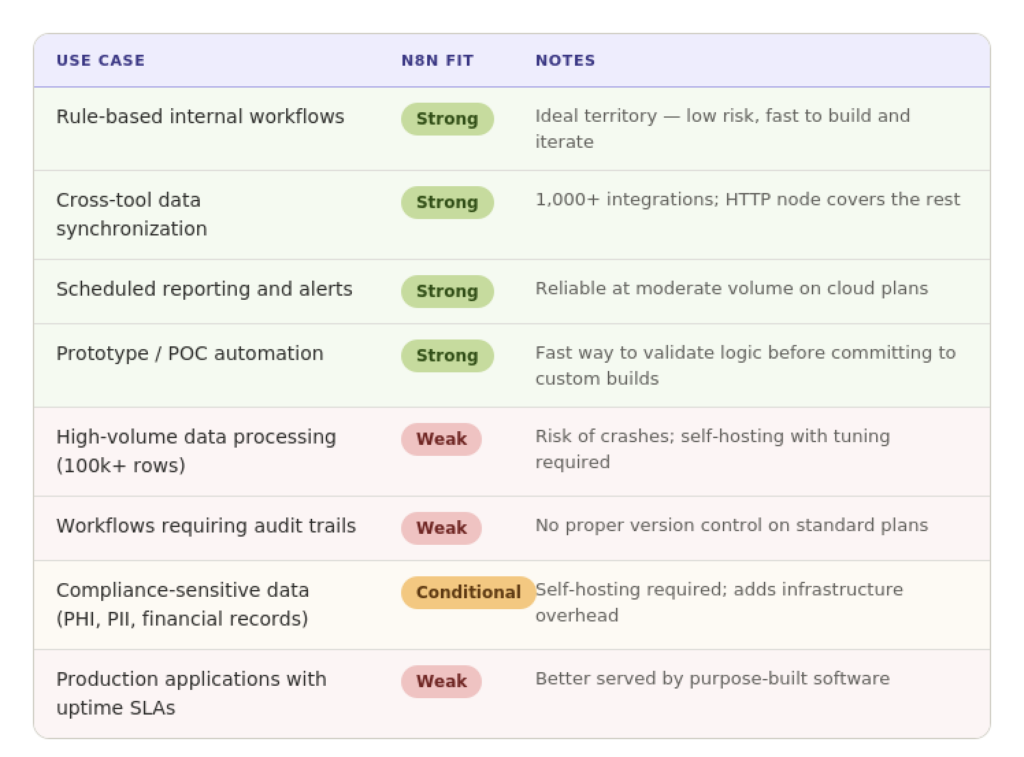
The table below maps common operations use cases against n8n's fit:
How Altamira can help operationalize automation
AI process automation discovery
The hardest part of automation isn't building workflows but figuring out which ones are worth building. Not every manual process is a good candidate. Some are too infrequent. Some involve judgment calls that rules can't capture. Some are better fixed by changing the process itself rather than automating it.
Altamira helps operations teams work through this before writing a single node. The discovery process maps your workflows, identifies which have the highest volume and clearest logic, and produces a prioritized roadmap. You get the actionable output: a ranked list of automation opportunities with realistic scope and impact estimates, not a general statement that "more could be automated."
Integration with CRM, ERP, and internal tools
Most operations teams work across a combination of systems that weren't intended to talk to each other: a CRM, an ERP, a project management tool, a financial platform, and several spreadsheets that have grown into something more load-bearing than anyone expected. Getting those systems to exchange data reliably, without manual intervention and without accumulating errors, is usually the core problem.
Altamira builds integrations that go beyond what no-code platforms handle cleanly. When the business logic is complex, data volumes are high, or error tolerance is low, custom integration work delivers the reliability and control that a visual workflow editor cannot consistently provide.
Custom software development when no-code is no longer enough
Some workflows grow. The logic gets more complex, the volume increases, the compliance requirements tighten, or the team needs features, granular access controls, detailed audit logs, and custom reporting that n8n wasn't built to provide. At that point, the question isn't whether to move beyond the no-code tool. It's how to do it without losing what's already working.
Altamira supports that transition: taking what was validated in a no-code environment and rebuilding it as maintainable software that the team can rely on in production. The n8n prototype becomes the specification, not a dead end.
Practical checklist before building an n8n workflow
The most common reason AI process automation projects fail is a lack of clarity into the process before the build starts. This checklist addresses the gaps that cause the most problems.
Define the workflow owner
Every workflow needs a named owner: one person responsible for monitoring it, updating it when upstream systems change, and deciding when it needs to be rebuilt. Automated workflows degrade silently. A field is renamed in the CRM, a trigger stops firing, data stops moving, and nobody notices until something further downstream breaks. Without an owner, that's how it stays.
The owner doesn't need to be technical. They need to understand the process and have the authority to make decisions about it.
Learn the difference between AI vs Automation tool
Map inputs and outputs
Write down what enters the workflow, where it comes from, what happens to it in the middle, and what comes out and where it goes. This sounds basic because it is, and it's the step that's most often skipped. Pay particular attention to:
- Data format consistency: Is the input always structured the same way? What happens when it isn't?
- Error states: What should the workflow do when a step fails, a record is missing, or an API is unavailable?
- Edge cases: Are there exceptions to the standard path that need separate handling, or that would silently produce incorrect output?
Assumptions made during this step are the source of most post-launch surprises.
Set success metrics
Before the workflow goes live, define what success looks like in measurable terms. Without this, you won't know whether the automation is working or quietly accumulating problems. Useful metrics for operations workflows include:
- Time saved per week against the manual baseline
- Error rate, records processed incorrectly as a percentage of total records
- Workflow failure rate and average time to resolution
- Execution volume compared to expected load
Set a review date: 30 days after launch is a reasonable default, and check these numbers. If the workflow is delivering, you'll know. If it isn't, you'll find out before it becomes someone else's crisis.
Conclusion
n8n works. For rule-based, moderate-volume, low-stakes operations workflows, it's a practical and cost-effective tool that lets teams automate without depending on engineering. As a rule, teams that commit to it consistently and systematically see meaningful time savings and error reductions.
However, high data volumes, compliance requirements, audit trail needs, and production reliability expectations will each, in their own way, push a team past what n8n handles well.
The teams that get the most from it are the ones who understand those limits in advance and choose their first workflows accordingly, starting where the fit is strong, building the discipline of owning and measuring automations, and knowing when the right next step is something custom.
The tool doesn't determine the outcome. The clarity about what you're trying to automate, and why, does.
FAQ
Here are the FAQ answers:
What is n8n automation?
n8n is an open-source workflow automation platform that connects business tools and moves data between them based on triggers and rules, without requiring custom code for most use cases. You build workflows visually by linking nodes, each representing an action in an app or service. When a trigger fires (a form submission, a webhook, a scheduled time), the workflow runs automatically. Unlike Zapier or Make, n8n can be self-hosted, supports custom code inside workflows, and charges per execution rather than per step, which makes it significantly cheaper at scale for complex, multi-step processes.
When is no-code workflow automation enough for operations teams?
It's enough when the process is repetitive, the rules are clear, and the consequences of a failure are manageable. If the same trigger always produces the same expected output, route this record, send that notification, sync these fields: n8n handles it reliably. It's also well-suited for internal processes where error tolerance is higher and for prototyping logic before committing to a custom build. The moment a workflow requires judgment calls, high-volume data processing, complex access controls, or compliance-grade auditability, no-code starts to show its limits.
What workflows should not be built only in n8n?
Workflows that process large datasets (100,000+ rows regularly), require detailed audit trails for compliance, involve sensitive data like PHI or financial records on the cloud plan, or need production-grade uptime guarantees. Also, workflows where the logic branches significantly based on context: the kind of decision-making that rules can't cleanly capture. These are better served by custom software, or at minimum by n8n self-hosted with proper infrastructure configuration and engineering oversight.
How does n8n connect with CRM and project management systems?
Through native integration nodes for the most common platforms: Salesforce, HubSpot, Pipedrive, Asana, Jira, Monday.com, and others, which handle authentication and standard API operations without any code. For systems without a native node, the HTTP Request node connects to any REST API directly. In practice, most US operations teams can connect their core tool stack through existing integrations. Where custom field mapping or non-standard API behavior is involved, some configuration is needed, but it rarely requires a developer.
What are the security risks of self-hosted n8n?
The main risks are infrastructure exposure and access control. A self-hosted instance needs to be properly secured: HTTPS enforced, the instance not publicly exposed without authentication, credentials stored in environment variables rather than hardcoded into workflows, and regular updates applied. Credential management inside n8n is another consideration, stored API keys and OAuth tokens need to be treated with the same care as any sensitive system credential. Teams without dedicated DevOps or infrastructure support often underestimate the ongoing maintenance burden, which leads to configuration drift and unpatched versions over time. Learn more about AI readiness.
How can US operations teams measure n8n automation ROI?
Start with three numbers before any workflow goes live: time spent on the manual process per week, error rate, and how often the process causes downstream delays. After 30 days of automation, measure the same things. Beyond time saved, look at error reduction, automation typically cuts manual data entry errors by 80–90%, and at volume capacity: how much more the process can now handle without adding headcount. For reporting workflows specifically, track how quickly decision-relevant information reaches the people who need it.
ROI compounds across workflows, so teams that automate consistently across ten to fifteen processes in the first year tend to see gains that are hard to attribute to any single workflow but are visible at the team level.
When should a company replace n8n workflows with custom software?
When the workflow starts requiring workarounds to do things the platform wasn't designed to do. Specific signals: you've added error-handling logic that's more complex than the original workflow, you're managing infrastructure to keep up with volume, compliance requires auditability that the platform can't provide, or the team spends more time maintaining the automation than they saved by building it. A well-built n8n workflow can also serve as a useful specification for the custom build: the logic is already mapped, the edge cases are documented, and the team understands exactly what needs to be built and why.