
Distribution and logistics companies handle more documents than you can imagine. Carrier invoices, freight bills, customs paperwork, warehouse receipts...They arrive in various formats from dozens of vendors, and most are still processed by hand.
AP teams retype line items from PDFs into ERP systems that were set up years ago, and the volume keeps growing while the process stays the same.
The numbers are hard to ignore. Ardent Partners puts the cost of manual invoice processing at $15 to $40 per invoice. The average cycle takes 17.4 days without automation. And APQC research shows that over 60% of invoice errors trace back to manual data entry.
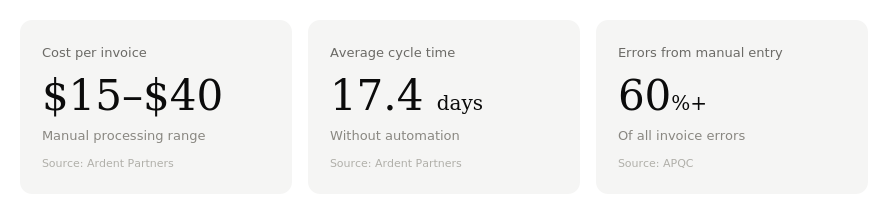
For distribution teams handling thousands of invoices a month across dozens of carriers, that manual work becomes a real drag on operations.
You do not need to rip out your ERP to fix this. Invoice data capture tools sit on top of what you already have. Explore our AI Optical Character Recognition.
Why invoice processing slows down logistics and distribution teams
Logistics companies have automated nearly every physical touchpoint in their supply chain. GPS tracking, warehouse sensors, route optimization. But the financial back end lags behind.
Invoices still arrive as PDFs, scanned documents, and email attachments. Each one demands human review before anything moves.
Manual entry creates delays and errors
An experienced AP clerk can process 25 to 40 invoices per day by hand, according to IOFM staffing benchmarks. That includes header entry, line-item keying, PO matching, and routing for approval. At that pace, a company processing 2,000 invoices a month needs a dedicated team just to keep up.
And the work is not just slow. It is error-prone. Industry data puts the manual data-entry error rate at roughly 1-2% per invoice. That sounds small until you multiply it across thousands of documents.
A transposed digit on an invoice total, a mismatched PO number, a duplicate entry that slips through. Each mistake triggers follow-up: emails to the vendor, corrections in the ERP, reconciliation across accounting periods. Ardent Partners estimates the average invoice exception takes 8.3 days to resolve.
In distribution, those errors have a direct operational cost. Late payments strain carrier relationships. Inaccurate records make it harder to negotiate freight rates. And AP teams spend their time chasing problems instead of managing cash flow. See how you can benefit with AI Process Automation
ERP workflows are often too rigid for document-heavy operations
Most ERPs were built for structured and predictable transactions. A purchase order goes out, goods arrive, an invoice comes in, and the three-way match closes the loop. That works well enough for standardized orders.
Logistics invoices are not standardized.
Freight invoices include fuel surcharges, detention fees, accessorials, and line-haul rates that vary by lane and carrier. A single shipment might generate invoices from a carrier, a customs broker, and a warehouse operator, each in a different format.
ERPs handle the structured data fine once it is inside the system. The only problem is getting it there. Someone still has to read the PDF, figure out which fields go where, and key them in manually. The ERP does not parse the document. It just stores what a person types. Explore what's Software Integration
What invoice data capture automates
Invoice data capture is the step between receiving a document and entering it into your accounting system. It reads the invoice, extracts the relevant fields, and passes structured data to your ERP or AP workflow.
Line item extraction
This is where most of the manual labor lives. A logistics invoice might have 20 or 30 line items covering different shipments, surcharges, and rates. Modern document parsing tools use OCR combined with machine learning to identify and extract those fields regardless of layout. The invoice total might be at the top on one carrier's template and at the bottom on another. AI-based extraction handles that variation without needing a custom template for every vendor. Learn more about Custom Software Development
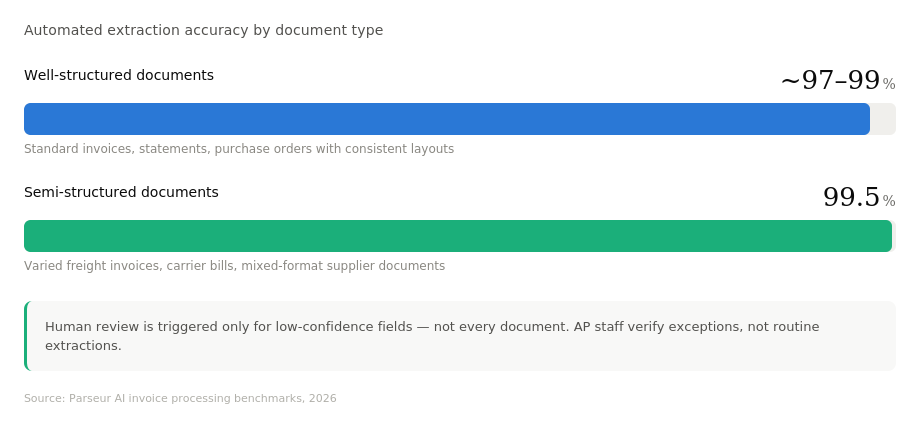
Automated extraction now reaches the high-90% range on well-structured documents, according to Parseur's 2026 benchmarks. For semi-structured layouts such as varied freight invoices, accuracy is around 99.5%, with human review triggered only for low-confidence fields.
Matching invoices to purchase orders
Once line items are extracted, the system compares them against open purchase orders and receiving records in the ERP. If the quantities, prices, and terms match, the invoice moves straight to approval. If something does not line up, like a short shipment, a rate discrepancy, or a missing receipt, then the system flags it.
Distribution companies see the biggest time savings at this point. Three-way matching by hand is tedious and repetitive. Automating it means AP staff only touch the invoices that actually need attention, not every document that comes through the door.
Routing exceptions to the right team
Not every mismatch is the same. A price variance might need procurement's input. A missing receipt might need the warehouse to confirm delivery. A flagged duplicate might just need a quick check from the AP lead.
Good capture systems automatically classify the exception type and route it to the right person. That cuts the resolution time and keeps invoices from sitting in a generic queue where nobody owns the problem. Learn more about Web-based electronic data capture platform
Why ERP replacement is not required
This is the part that stops many logistics companies from acting. They assume fixing AP means a full ERP migration as a project that could take 18 months and disrupt every team. You rarely need this.
OCR and document parsing can sit on top of existing systems
Invoice data capture tools are designed to work alongside your ERP, not replace it. The capture layer reads the document, extracts structured data, and validates it against business rules. Then it passes clean, formatted data into your existing system through standard interfaces.
Your AP team keeps using the same ERP. The same approval workflows stay in place. The data just arrives already extracted instead of being typed by hand.
API and middleware layers reduce disruption
Most modern capture tools connect to ERP systems such as SAP, Oracle, Microsoft Dynamics, and NetSuite via APIs or middleware. The integration layer translates extracted invoice data into the format your ERP expects. No schema changes. No database migration.
For companies with older or heavily customized ERPs, middleware bridges the gap without touching the core system. The capture tool writes to a staging area, the middleware maps the fields, and the ERP receives the data as if it were entered through its normal input screen.
What good invoice capture looks like in practice
The business case for invoice data capture comes down to three outcomes. Here is how manual and automated AP compare on the metrics that matter, based on Ardent Partners and IOFM benchmarks:
| Metric | Manual AP | Automated AP |
|---|---|---|
| Cost per invoice | $15 – $40 | $3 – $5 |
| Average cycle time | 17.4 days | 3.1 days |
| Error rate | 1 – 2% | Below 0.8% |
| Exception rate | 22% | 9% |
| Duplicate detection | Caught at reconciliation | 95% caught before payment |
Faster cycle time
That 14-day gap in cycle time is almost entirely explained by automation. Faster processing means fewer late payments, better vendor terms, and more early-payment discounts captured. For distribution companies with tight cash cycles and time-sensitive freight payments, shaving days off the invoice cycle directly affects working capital. Learn more about Electronic document management tool
Better data quality
Fewer errors mean fewer exceptions, fewer vendor disputes, and cleaner financial records at month-end close. Automated systems also catch duplicates before payment rather than during reconciliation, which eliminates one of the most common sources of overpayment in high-volume AP.
Fewer AP exceptions
The gap in exception rates is not due to top performers having simpler invoices. Their capture and matching systems catch problems earlier, before they require manual intervention. For a logistics company processing 5,000 invoices a month, moving from 22% to 9% means 650 fewer invoices needing manual handling every month.
How Altamira helps automate document-heavy workflows
Altamira has spent 15 years building custom software and AI solutions for companies dealing with exactly this kind of operational friction. With 140 clients served and a 95% retention rate, our track record speaks to delivery, not promises.
With our discovery-led approach, we map your actual document workflows, identify where manual effort is highest, and build capture and integration layers that connect to what you already run.
Our team has helped companies automate invoice capture, build extraction pipelines for a variety of document formats, and integrate those pipelines with existing ERP systems. Our integration services cover ERP, supply chain management, and workflow automation platforms, with API and middleware support that reduces deployment risk.
For logistics and distribution companies, this matters because the problem is rarely just "we need OCR." It is "we need OCR that understands our carrier invoice formats, matches against our PO structure, and feeds clean data into an ERP we customized six years ago." That requires engineering judgment, not a plug-and-play product.
A practical checklist before starting an invoice capture project
Before you engage a vendor or start building, answer these questions. They will shape the scope and keep the project focused.
- Know your volume and cost baseline. How many invoices does your team process per month? How many hours does AP spend on manual entry and exception handling? If you do not have exact numbers, estimate using APQC benchmarks: $10 to $22 per invoice for manual processing, $3 to $5 for semi-automated workflows.
- Map your document formats. How many distinct invoice layouts do you receive? Are they mostly digital PDFs or scanned paper? Do your top 10 carriers cover 80% of your volume? This tells you whether template-based OCR is enough or whether you need AI-based extraction that handles layout variation.
- Assess your ERP integration options. Does your ERP support API-based data import? Is there an existing staging table or import utility? This determines whether you need middleware and how much custom work the integration requires.
- Define your exception handling workflow. Who resolves price variances? Who confirms receipt? Who approves payments above a certain threshold? Automating capture without automating routing just moves the bottleneck from data entry to approval queues.
- Set success metrics before you start. Pick two or three numbers you will track: cost per invoice, cycle time, exception rate, duplicate payment rate. Measure them now so you can measure them again six months after go-live.
Conclusion
Logistics and distribution companies do not need to live with slow, error-prone invoice processing. And they do not need a full ERP replacement to fix it. Invoice data capture automates the most time-consuming parts of AP like line-item extraction, PO matching, and exception routing, while sitting on top of the systems you already use.
The math is clear. Manual processing costs $15 to $40 per invoice. Automation brings that down to $3 to $5. Cycles drop from weeks to days. Error rates fall by more than half.
The first step is understanding where your current process breaks down. Book a discovery call with Altamira to map your AP workflow and identify the highest-value automation opportunities.
FAQ
What is invoice data capture?
Invoice data capture is the process of extracting structured information from invoice documents: PDFs, scans, or email attachments and converting it into data your accounting or ERP system can use. Instead of having a person read each invoice and enter the fields, software handles the extraction automatically.
How does invoice data capture work in logistics and distribution?
Logistics invoices come from carriers, freight forwarders, customs brokers, and warehouse operators, often in different formats. Capture tools use OCR and machine learning to read those documents, extract relevant fields such as line items, PO numbers, rates, and surcharges, and pass the structured data to the company's ERP for matching and approval. The system flags exceptions and routes them to the right team.
Can invoice capture be automated without replacing the ERP?
Yes. Most capture tools are designed to sit on top of your existing ERP, not replace it. They connect through APIs or middleware, passing clean data into the same system your AP team already uses. No schema changes, no migration, no retraining required.
What data fields should be extracted from supplier invoices?
At minimum: vendor name, invoice number, invoice date, due date, PO number, line-item descriptions, quantities, unit prices, totals, and tax amounts. In logistics, you also need freight-specific fields like shipment references, accessorial charges, fuel surcharges, and lane or route identifiers.
How does OCR improve accounts payable workflows?
OCR reads text from invoice documents so AP staff do not have to type it manually. When combined with machine learning, it can identify and extract specific fields regardless of where they appear on the page. That eliminates the data-entry step, reduces errors, and lets AP teams focus on exceptions and approvals rather than on keying data.
What are the main risks in invoice automation projects?
The most common ones are poor data quality in the ERP (dirty vendor master records, inconsistent PO structures), underestimating the variety of invoice formats across suppliers, and automating capture without also automating exception routing, which just shifts the bottleneck. Integration complexity with older or heavily customized ERPs can also add time and cost if not scoped properly upfront.
How do logistics companies measure ROI from invoice capture automation?
The standard metrics are cost per invoice, processing cycle time, exception rate, and duplicate payment rate. Compare your baseline numbers before the project to the same metrics six months after go-live. Most companies also track AP staff hours freed up and early-payment discounts captured, since both directly impact working capital.