
Let's be honest, a working agent demo takes an afternoon. However, getting that same agent into a live SaaS product, where it touches real customer data across many tenants, takes months. Embedding AI agents into products has less to do with the model and more to do with the emerging questions around it. What is the agent allowed to do? Whose data can it see? What happens when it acts on the wrong thing?
MIT's Project NANDA studied 300 enterprise AI deployments in 2025 and found that 95% produced no measurable impact on the bottom line. The report placed the blame on integration and processes rather than model quality, as many would expect. Gartner anticipates more than 40% of agentic AI projects to be canceled by the end of 2027. It blames rising costs, unclear value, and weak risk controls.
As Deloitte predicts AI agent usage in SaaS will grow rapidly by 2026, in this article we will explore the required permissions, guardrails, and workflows needed for embedding AI agents into SaaS products.
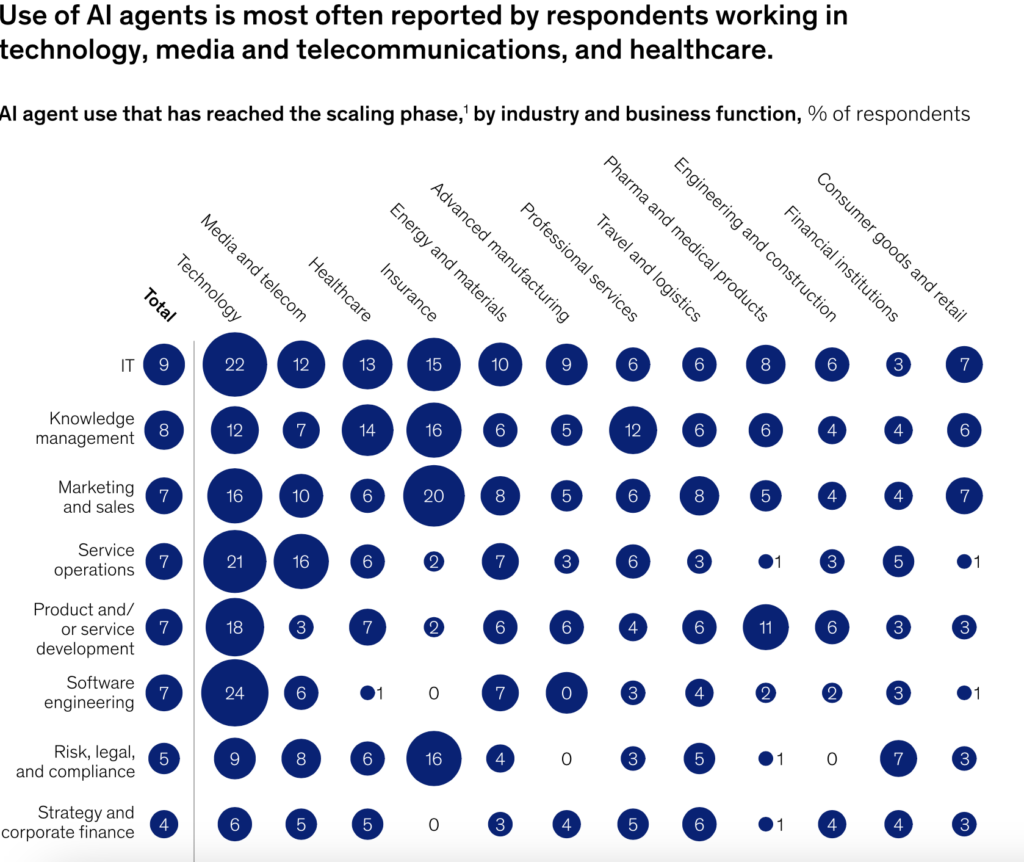
Why embedded agents fail to deliver value
The demo runs on one happy path
You can't disagree that a demo is a controlled story. Usually, you have only one user, one clean account, one request that the agent handles well because you picked it. On top of it, there's nothing at stake. The data is fake or friendly, and a mistake costs nothing. That is the point of a demo, and it is why demos are easy to build and easy to trust too much.
Gartner's Anushree Verma described most current agentic projects as experiments "driven by hype and often misapplied." The demo shows capability while saying nothing about reliability, and the two are not the same. An agent that answers a scripted question flawlessly can still fail four times out of five when real inputs arrive in an order nobody rehearsed.
Production adds permissions, tenants, and liability
Production changes the question. Now the agent must act for the right person, on the right data, at the right time, and stop when something goes wrong. A single agent now serves thousands of accounts within a multi-tenant SaaS platform. It can read records, call tools, move money, and change settings. Every one of those actions carries liability that the demo never had.
McKinsey's State of AI survey drew on nearly 2,000 respondents across roughly 105 countries.
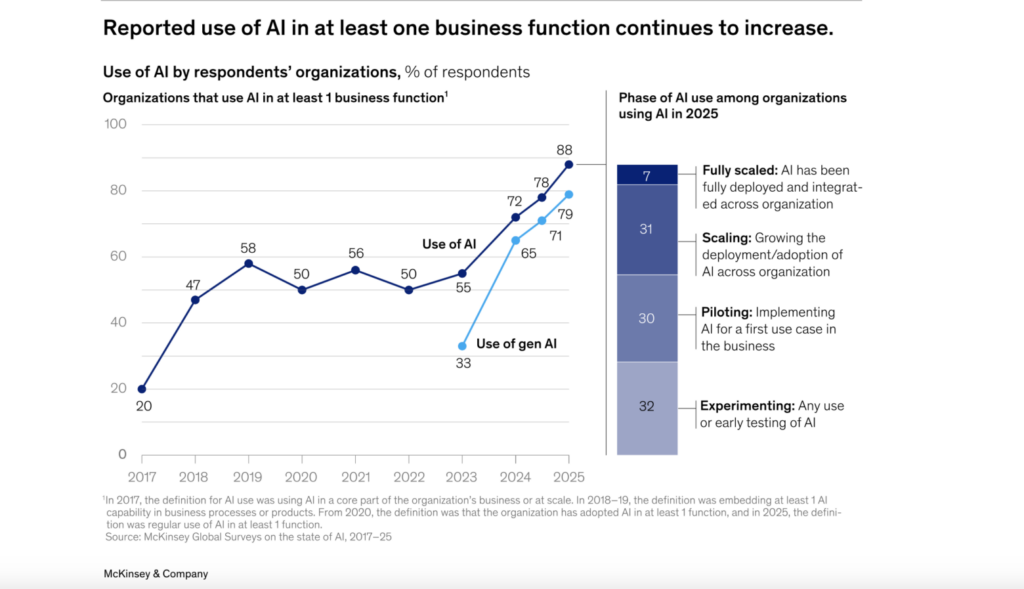
It found that 51% of organizations had logged at least one negative AI incident in the prior year. The list included inaccurate output, privacy breaches, and unauthorized actions taken by AI systems. Those are production problems. They do not show up in a demo because a demo has no production to break.
Decide what the agent is allowed to do before you decide how it thinks
Read-only, suggest, act-with-approval, act-autonomously
Autonomy is a ladder, and each rung changes the risk profile. A read-only agent looks at data and answers. A suggesting agent drafts an action and waits for a person to run it. An act-with-approval agent prepares the action and executes only after a human confirms. An act-autonomously agent decides and acts on its own.
You earn autonomy for a given task by proving the agent is reliable at the rung below it. Start where a mistake is cheap and move up as the evidence accumulates.
Mapping autonomy levels to business risk
The right rung depends on what breaks if the agent is wrong. Reading data across tenants risks exposure. Acting autonomously on billing risks silent, scaled damage before anyone notices. The table below maps each level to its main risk and the control that keeps it in check.
| Autonomy level | What the agent does | Example in a SaaS product | Main business risk | Typical control |
|---|---|---|---|---|
| Read-only | Reads data and answers questions | Summarizes a customer's ticket history | Data exposure across tenants | Permission scoping, tenant isolation |
| Suggest | Drafts an action for a person to run | Proposes a refund amount | Weak suggestions accepted without thought | Clear labeling, easy editing |
| Act with approval | Prepares an action, executes after a human confirms | Cancels a subscription once a person signs off | Approval fatigue and rubber-stamping | Human-in-the-loop approval, escalation path |
| Act autonomously | Decides and acts with no person in the loop | Adjusts a billing rule on its own | Silent mistakes at scale | Spend and rate limits, kill switch, audit trail |
The value of writing this down is that it forces a business decision. Learn more about the difference between data governance vs data management.
Permission design in a multi-tenant SaaS
The agent inherits the user's scope, never more
The safest default is simple. An agent acting on behalf of a user should see exactly what that user can see, and nothing else. If a support rep cannot read another customer's invoices, the agent working for that rep cannot either. This is least privilege applied to software instead of people, and it is the single most important rule in permission scoping for a multi-tenant SaaS.
The rule matters because agents are easy to over-permission and hard to walk back. An analysis by Entro Security found that 97% of non-human identities carry more privileges than their function needs. Role-based access control, the same model you already use for humans, gives the agent a bounded role instead of a blank check.
Service accounts and why they leak privileges
Teams often wire an agent to a single service account with broad access, because it is faster than scoping each action. That account becomes a skeleton key. It can reach every tenant, so any prompt injection or logic bug can too. CyberArk's research reported that machine identities now outnumber human ones by more than 80 to 1. Nearly half hold sensitive or privileged access.
Phil Venables, former chief information security officer at Google Cloud, put the pattern plainly: "excessive privileges, dormant accounts, and over permissioning are widespread." A shared service account concentrates all three. The fix is to tie the agent's actions to the acting user's identity. Scope then travels with the request instead of living in one over-powered account.
Tool-level scoping instead of blanket API access
Giving an agent an API key is giving it the whole API. Tool calling lets you do the opposite. You expose a small set of named tools, each with a narrow contract, and the agent can only call those. A "read customer profile" tool and a "refund up to $50" tool are safer than a raw payments API. The boundary lives in code you control rather than in the model's judgment.
Scoping at the tool level also gives you a place to check every request. Before a tool runs, you can confirm the caller's permissions, validate the inputs, and log the attempt. That checkpoint is where a lot of guardrail work lives, which is the next problem to solve.
Guardrails that hold in production
Input and output validation
An agent's inputs come from users, other systems, and its own earlier steps. Any of them can be malformed or hostile. Validate what goes in, and validate what comes out before it reaches a user or a downstream tool. If an agent proposes a refund of $50,000 on a $30 plan, a simple bounds check catches it long before a customer does.
Output validation matters because small errors compound. An analysis by Wand.ai showed that a 1% per-step error rate results in roughly 87% cumulative failure across 200 steps. Each unchecked step passes its mistake to the next. A validation layer breaks that chain by stopping bad output before it becomes the input to the next decision.
Spend, rate, and blast-radius limits
Give every agent hard ceilings it cannot exceed. Cap how much it can spend, how many actions it can take per minute, and how many records a single run can touch. These limits define the blast radius, meaning the worst case if the agent misbehaves. A capped agent that goes wrong wastes a few dollars. An uncapped one can drain an account or rewrite a thousand records before anyone reacts.
McKinsey framed the shift well for 2026. Teams can no longer worry only about a system saying the wrong thing. They now have to plan for entire system that does the wrong thing, misuses tools, or works past its guardrails.
Kill switch and rollback path
Assume the agent will act wrongly at some point, and design for that day. A kill switch lets an operator halt the agent instantly, across all tenants, without a deploy. A rollback path lets you undo what it did. Actions that cannot be undone, like sending an irreversible payment, deserve an extra approval step precisely because there is no rollback.
Designing the workflow
Map the decision points before automating them
An agent lives within an existing business process. Before automating it, draw the process as it runs today and mark every point where a decision gets made. Those decision points are where autonomy, approval, and escalation belong. Automating a workflow you have not mapped tends to hide the risky decisions rather than remove them.
Agent orchestration is the plumbing that connects those steps, but the plumbing is not the design. The design is the sequence of decisions and who owns each one. Get that right and the orchestration becomes straightforward. Skip it, and no framework will save you.
Where the human stays in the loop
Human-in-the-loop approval is not free, and putting a person on every action defeats the point. Place approvals where they earn their cost, at high-stakes or irreversible decisions, and let the agent run the low-stakes steps alone. When the agent is unsure, or an action crosses a threshold, it should follow an escalation path to someone with the context to decide.
What the user sees when the agent is uncertain
Trust is built in the uncertain moments. When the agent is confident, it can act and report. When it is not, it should say so, show its reasoning, and offer a clear next step rather than guessing. NIST, launching its AI Agent Standards Initiative in early 2026, highlighted how difficult real-time oversight becomes when agents run long chains of hidden steps. Surfacing uncertainty to the user is one of the few oversight tools that still works at that scale.
Explore what's staff augmentation vs full hiring: When enterprise AI teams need delivery capacity fast
Observability: you cannot govern what you cannot replay
Tracing every tool call and decision step
If you cannot replay what an agent did, you cannot debug it, audit it, or improve it. Agent observability means capturing every input, decision, tool call, and output as a connected trace. When something goes wrong, you follow the trace to the exact step that broke, rather than guessing from a final result. That same trace is the audit trail your regulatory compliance and security teams will ask for.
Evaluation sets and regression testing for agentic system behaviour
Agents drift. A prompt tweak or a model update can quietly change behavior that used to work. An evaluation set, a fixed collection of real scenarios with known good outcomes, catches that drift before users do. Run it on every change, the way you run unit tests on code.
This matters more than raw accuracy scores suggest. Researchers at Princeton noted that a mean success rate cannot tell a predictable failure apart from a random one. That difference decides how much you can trust an agent. Evaluation sets built from real cases show you how the agent fails, not just how often.
Metrics product teams should track from week one
Watch a small set of numbers from launch. Track task success rate, human intervention rate, escalation frequency, and the cost per completed task. Rising interventions or escalations signal that the agent is drifting or facing inputs it was not built for. A study of multi-agent systems catalogued failure rates between 41% and 86.7% across common frameworks, with coordination breakdowns the largest single cause. Metrics are how you notice you are heading there while you can still correct.
Build vs integrate: a decision framework for SaaS teams
Not every agent should be built in-house, and not every vendor agent fits your product. The choice comes down to how central the agent is, how sensitive your data is, and whether you have a team to own it. Build when the agent's behavior is part of what customers pay for. Integrate when the task is generic and a vendor already meets your bar.
| Factor | Lean toward building your own | Lean toward integrating a vendor agent |
|---|---|---|
| Differentiation | The agent's behavior is part of your product's value | The task is generic, like scheduling or search |
| Data sensitivity | You need tight control over where data flows | A vendor already meets your compliance bar |
| Team capacity | You have engineers to own evaluation and upkeep | You want to avoid running agent infrastructure |
| Speed to launch | You can trade time for control | You need something live this quarter |
| Governance | You require custom audit trails and permission scoping | Vendor controls satisfy your risk team |
The honest answer is often a mix. Build the agent's core reasoning where it differentiates you, and integrate vendor tools for the generic parts around it. What you should not do is buy a vendor agent and skip the permission, guardrail, and observability work. That work is yours regardless of who built the model.
How Altamira helps SaaS teams ship agents into production
Altamira works with SaaS teams on the part that decides whether an agent survives contact with real users, meaning everything around the model. That starts with a permission model built on tenant boundaries and least privilege. The agent inherits each user's scope instead of a shared service account's reach.
From there, the work is guardrails and observability. Our team helps design input and output validation, spend and rate limits, a kill switch, and a failure recovery path. Tracing gets wired in, so every tool call leaves an audit trail. The rollout is phased on purpose. An agent starts read-only or suggest-only, proves itself against an evaluation set, and earns more autonomy only when the metrics support it.
The aim is an agent your product, security, and compliance teams can all defend. If that is your stage, the fastest first step is usually a short working session. It maps your agent's permission model and autonomy levels, so you can see what needs building.
A pre-launch checklist for embedded AI agents
Run through this before an embedded agent touches real users.
- Every agent action is scoped to the acting user's permissions, with no shared super-account.
- The autonomy level is set per task and signed off by the person who owns the risk.
- Tool calling replaces blanket API access, and each tool validates its inputs.
- Output is validated before it reaches a user or a downstream tool.
- Spend, rate, and blast-radius limits are in place and tested.
- A kill switch can halt the agent across all tenants without a deploy.
- Irreversible actions require explicit human-in-the-loop approval.
- An escalation path routes uncertain cases to a person with context.
- Every decision and tool call is traced into a durable audit trail.
- An evaluation set runs on every change to catch behavior drift.
- Launch metrics are live, including intervention and escalation rates.
Conclusion
Embedding AI agents into SaaS products rewards teams that treat permissions, guardrails, and workflow as the real work, and the model as the easy part. The demo proves an agent can act. Production asks whether it should, for whom, and what happens when it is wrong. Decide the autonomy level per task, and scope permissions to the acting user. Cap the blast radius, keep a person on the decisions that matter, and trace everything so you can replay it. Do that, and you join the small share of agentic AI projects that reach production instead of stalling on the way.
If you are planning an embedded agent, book a working session with Altamira. It maps the permission model, autonomy levels, and guardrails before you write your first line of orchestration. Contact us to learn more
FAQ
What is an AI agent inside a SaaS product?
It is software that can take actions inside your product, not just answer questions. An agent reads data, calls tools, and completes multi-step tasks toward a goal, such as resolving a support ticket or adjusting an account. The defining trait is action. A chatbot tells the user what to do, while an agent does it, which is why permissions and guardrails matter so much more.
How is an AI agent different from a chatbot or a copilot?
A chatbot holds a conversation and returns text. A copilot suggests actions a person then takes. An agent goes one step further by executing actions either on its own or after approval. The practical difference is consequence. When a chatbot is wrong, the user reads a bad answer. When an agent is wrong, it can move money or change data, so it needs the controls in this article.
What permissions should an AI agent have in a SaaS product?
As few as the task requires, and never more than the user it acts for. Apply least privilege and role-based access control the same way you would for a person. Scope access at the tool level rather than handing over a full API key. Tie each action to the acting user's identity so tenant boundaries hold. Avoid shared service accounts with broad reach, since they turn one bug into a cross-tenant breach.
How do you design human-in-the-loop approval for agent actions?
Place approvals where mistakes are costly or irreversible, and let the agent run low-stakes steps alone. Asking a person to approve everything causes approval fatigue, and they stop reading. Give the agent an escalation path so uncertain or high-threshold cases route to someone with the context to decide. The goal is fewer, better-placed checkpoints rather than a rubber stamp on every action.
How do you keep agent actions auditable in a multi-tenant SaaS?
Capture every input, decision, tool call, and output as a connected trace tied to the tenant and user. That trace is your audit trail, and it lets you replay any run to see exactly what happened. Store it durably so security and compliance teams can review actions after the fact. Without this, you cannot prove what an agent did, which makes governance impossible.
What should happen when an AI agent fails or takes a wrong action?
Failure recovery should be designed in advance, not improvised. A kill switch halts the agent immediately across all tenants, and a rollback path undoes what it did where possible. Actions that cannot be reversed should require approval before they run. Every failure should also land in the trace, so you can add it to your evaluation set and stop it from recurring.
How do you measure whether an embedded AI agent is working?
Track task success rate, human intervention rate, escalation frequency, and cost per completed task from launch. Success rate alone hides how the agent fails, so watch the interventions and escalations for signs of drift. Run an evaluation set of real scenarios on every change to catch regressions early. Working means reliable and improving over time, not impressive in a single demo.
When should a SaaS team build its own agent instead of integrating a vendor one?
Build when the agent's behavior is part of what customers pay for, or when your data is too sensitive to hand off. Integrate when the task is generic and a vendor already meets your compliance bar. Team capacity matters too, since a built agent needs owners for evaluation and upkeep. Whichever you choose, the permission, guardrail, and observability work stays with you.