
When a customer calls about a billing error, for example, the agent has seconds to pull up the right policy, stay on script, and keep the conversation from going sideways.
Most of the time, they're doing that without any real-time support, surfing a knowledge base that hasn't been updated in months, trying to recall a compliance disclosure from a training session they attended six weeks ago, and manually writing up notes the moment the call ends.
Real-Time Agent Assist (RTAA) makes a huge difference. It listens to the conversation as it happens and pushes relevant knowledge, compliance alerts, and suggested next steps directly to the agent's screen, all without manual search, tab-switching, or pause while someone puts the customer on hold to check something. Average handle time sits at six minutes and ten seconds across industries, but teams using RTAA consistently report reductions of 15 to 30% within the first quarter.
New agents take an average of 90 days to reach full productivity, and with annual turnover in contact centers hitting 31.2% in 2024, that ramp cycle repeats constantly. RTAA shortens it, as new hires can handle calls more confidently from day one because the system surfaces what they'd otherwise need to memorize. And with compliance prompts built in, script drift and policy errors get caught during the call rather than flagged in a review session days later.
This article breaks down where those gains come from, what to measure before you deploy, and where implementations tend to fall short.
Why support teams need real-time guidance
The need for real-time guidance is the result of three forces that have been building for years and are now harder to ignore.
Rising customer expectations
Customers don't call expecting to wait on hold while someone looks something up. They've already checked the FAQ, possibly tried the chatbot, and now they want a human who can actually solve the problem.
McKinsey's research shows that AI process automation in contact centers has cut cost per call by up to 50% for early adopters. That's not just an efficiency gain, as it resets the baseline for what customers think a support call should feel like.
When agents can't keep up, satisfaction scores drop, and trust erodes. The next interaction, if there is one, starts in a hole.
Long onboarding cycles
Getting a new agent to full productivity takes about 90 days. During that window, the contact center is absorbing the cost: slower calls, more escalations, and supervisor time that could go elsewhere.
And the financial stakes are higher than most managers realize. McKinsey estimates the true cost of replacing a single contact center agent at $10,000 to $20,000, once you factor in recruitment, training, and productivity losses during ramp-up.
With a 31.2% annual turnover rate, a team of 100 agents replaces roughly 31 people each year. That's not an occasional HR headache but a recurring budget line.
Explore what the AI agent development cost.
Knowledge base overload
Enterprise knowledge bases grow over time without anyone actively maintaining them. Old articles stick around after policies change. Product descriptions don't get updated when the product does. Two versions of the same troubleshooting guide coexist because no one deleted the original.
Real-time agent assist doesn't clean up your knowledge base, but it can reduce the cost of a messy one by surfacing the most relevant content automatically, so agents aren't manually hunting through it during a live conversation.
What real-time agent assist does
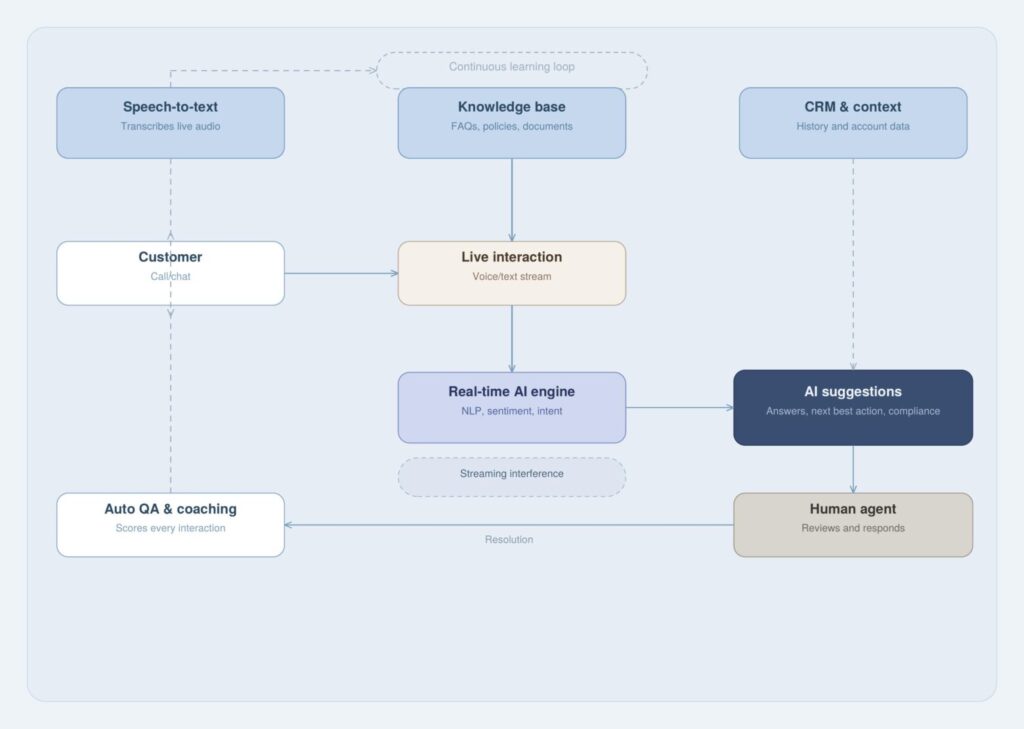
At its core, the technology listens to a conversation as it unfolds and pushes relevant guidance to the agent's screen without interrupting the call or requiring any manual input.
The agent sees suggested responses, policy excerpts, or next-step prompts appear in a side panel within whatever interface they're already using. They don't need to switch tabs or run a search.
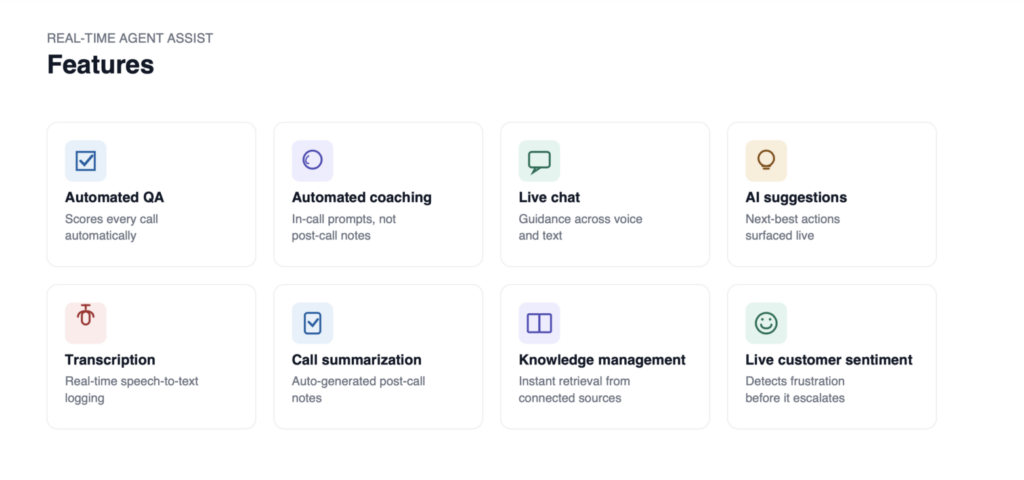
The more capable systems do three things at once.
Live recommendations
As the customer speaks, the system picks up on keywords, topics, and context. It then pulls the most relevant response suggestions or policy references and displays them in real time. The agent can use them as-is, adapt the wording, or ignore them but they're there before the agent would have thought to look.
Google Cloud's Agent Assist reports that this alone allows agents to handle 28% more conversations without adding headcount. The time saved on each call adds up quickly at scale.
Knowledge base retrieval
Rather than asking agents to search, the system searches for them. If the customer mentions a return, the refund policy surfaces automatically. If they describe an error, the relevant troubleshooting article comes up. This matters because after-call work: documentation, notes, record updates already accounts for 20 to 30% of total handle time. Slowing down mid-call to search makes that number worse.
Sentiment and intent detection
More advanced systems read the emotional tone of the conversation alongside its content. If the customer's language shifts toward frustration, the system can prompt the agent to adjust their approach or flag the call for a supervisor. If the phrasing suggests someone's about to cancel, a retention offer appears on screen.
This gives them a better signal, so the decision is better informed.
See why you need an AI agent orchestrator.
Where agent assist reduces handle time
Handle time reductions from real-time assist are well-documented: case studies consistently show 15 to 30% improvements within the first quarter of deployment. But the gains come from removing headaches at three specific points in the call.
Faster answer retrieval
The most immediate impact is on how quickly agents can access accurate information. IBM Watson Assistant improved query understanding by 25% for a major airline, cutting clarification time by 40 seconds per call. Across thousands of daily interactions, that adds up to a meaningful reduction in total time spent per agent per day.
A fintech company using one of the leading assist platforms reported a 10% drop in AHT alongside a 28% improvement in customer satisfaction scores. Faster answers and better answers tend to move together when agents aren't scrambling for information, they can focus on the conversation itself.
Automated after-call notes
After every call, agents write up what happened: the issue, how it was resolved, and what needs follow-up. This after-call work is time-consuming and inconsistent: different agents describe the same resolution in different ways, creating headaches for QA and making historical records less useful.
Systems with automated summarization generate a call summary from the conversation itself. The agent reviews and confirms it rather than writing from scratch.
Observe.AI's deployment at Accolade cut after-call work by 50%. Dialpad's summarization tool hit 45% for a retail client. The time savings let agents move to the next call faster, and the records end up more consistent.
What about your data governance and management? Explore your AI readiness
Better escalation routing
Escalations are expensive in two ways: the customer has to re-explain their issue from the top, and two agents are now tied up instead of one. Real-time assist reduces unnecessary escalations by giving first-tier agents the information they need to resolve more calls themselves.
When escalation is the right call, the system can route it more precisely, matching the issue type and customer sentiment to the right specialist rather than dropping it into a general queue. As a result, you can see fewer handoffs and shorter resolution paths.
Where agent assist reduces training costs
Training costs don't stop at onboarding. There's ongoing coaching, compliance refreshers every time a policy changes, product update briefings, and the hours supervisors spend reviewing calls. Real-time assist reduces the burden across all of these, not just the first few weeks.
Guided onboarding
A new agent working with real-time assist has a safety net from day one. The system surfaces the information they'd normally have to memorize, like policy details, approved responses, and compliance steps, so they can focus their attention on the conversation rather than trying to recall everything they covered in training.
In-house training programs cost between $1,000 and $2,000 per agent. When new hires handle calls more confidently from the start and ramp up faster, that investment pays off sooner. The system doesn't replace training, but it reduces how much agents need to hold in their heads at once.
Consistent scripts
One of the quieter costs in any contact center is script drift. Agents learn the correct phrasing, the required disclosures, and the right way to handle a specific complaint type.
A few months later, they're paraphrasing. Six months in, some have quietly reverted to whatever felt natural to them.
Real-time assist catches this in the moment. If a required disclosure hasn't been made, the system flags it. If a specific complaint type triggers a response protocol, the agent sees it before they've had a chance to go off-script. Supervisors don't have to catch it after the fact through call reviews and remediation sessions.
Real-time coaching
The standard coaching model is slow. A supervisor listens to a recording, spots a problem, and gives feedback in the next one-on-one, days after the conversation happened. By then, the agent has repeated the same mistake in a dozen more calls.
Real-time assist shifts some of that feedback into the call itself. If an agent talks over the customer, a prompt appears. If the conversation is heading in the wrong direction, a redirect comes up on screen. Agents report higher job satisfaction when they feel supported during difficult calls rather than corrected afterward, and that satisfaction matters because it directly affects turnover, which directly affects replacement costs.
What to measure before implementation
Real-time agent assist will show results, but only if you can see them. Before you deploy, get a clear baseline on the metrics the technology is most likely to move. These six are the ones that matter most.
| Metric | What it measures | Why it matters before you deploy |
|---|---|---|
| Average Handle Time (AHT) | Total time per interaction (talk + hold + wrap-up) | Sets your baseline: you can't claim a 20% reduction without knowing where you started |
| First Contact Resolution (FCR) | % of issues resolved without a follow-up or transfer | Low FCR usually means agents are guessing or escalating because they can't find answers fast enough |
| Agent Satisfaction Score | Survey-based measure of how agents feel about their work | Dissatisfied agents leave. Turnover costs $10K–$20K per head to replace |
| Compliance Error Rate | How often agents miss required disclosures or deviate from scripts | If this is high pre-deployment, it's one of the clearest use cases for real-time prompting |
| Knowledge Base Search Frequency | How often do agents manually search during a live call | High frequency means your knowledge base isn't surfacing the right content fast enough |
| New Agent Ramp Time | Weeks until new hires consistently hit performance benchmarks | This is where guided onboarding pays off fastest: shorter ramp means faster ROI |
Skipping this step is how deployments go unrecognized. Without a baseline, you can't demonstrate the ROI, and without a demonstrated ROI, the next budget cycle becomes a harder conversation.
See our AI strategy consulting services
Implementation risks
The technology works. The failures tend to come from what surrounds it. Here are the three problems that show up most often.
Poor knowledge base quality
Agent assist pulls from whatever knowledge base you connect it to. If that source has outdated articles, conflicting guidance, or content that's too vague to act on, the system will surface the wrong answer at the wrong moment. Agents figure this out quickly, start ignoring the recommendations, and the tool loses credibility.
Before you go live, audit the knowledge base. Flag content that's outdated, duplicated, or too generic to be useful in an actual call. The assist tool is only as good as what it can draw from.
CRM integration gaps
The difference between a useful recommendation and a generic one is context. If the assist system can't access the customer's account history, previous interactions, or purchase records from your CRM, it's working blind. A suggestion that ignores who the customer is and what they've already been through isn't much help.
Map your software integration requirements before you choose a vendor. Find out which CRM fields the system can access, how current the data sync is, and whether your custom fields are supported. This is often where the real implementation work lives.
Data privacy exposure
Real-time assist processes live customer conversations, which means it handles personal data, sometimes sensitive personal data, in healthcare or financial services. You need to know how conversation data is stored, who has access to it, how long it's retained, and whether customers are informed that an AI system is involved.
Check compliance requirements for every market you operate in, and establish internal policies for data retention (data governance and data management) before the system goes live. This isn't a post-launch item.
Wonder how to measure AI agent performance?
How Altamira builds AI support workflows
Altamira.ai builds custom AI systems for customer support teams, with a focus on measurable outcomes, a proper data governance strategy and framework, and alignment with specific operational problems, rather than general-purpose deployments that require the client to figure out where the value lies.
AI agent sevelopment
For high-volume, structured support tasks such as routing, triage, and resolving repeatable issues, we build AI agents that handle the work autonomously. This reduces the number of calls that reach human agents without degrading the quality of the customer experience. Explore our AI agent development services
Chatbot and recommendation systems
Where teams need real-time assist or customer-facing self-service, Altamira develops recommendation systems and AI chatbots trained on the company's own product data, policies, and interaction history. The output is specific to the client's context, not a generic model fine-tuned with a few examples.
Explore chatbot and recommendation engine development service.
Integration with customer support tools
Getting AI output in front of agents requires connecting it to the tools they already use. Altamira handles the technical layer: CRM, telephony platform, ticketing system, AND knowledge base, so agents get guidance within their existing workflow, not in a separate tool they have to monitor alongside everything else.
Conclusion
Real-time agent assist is a targeted solution to specific, measurable problems: calls that take too long because agents can't find information quickly enough, after-call documentation that eats into capacity, onboarding that drags on for three months, and coaching feedback that arrives too late to make a difference.
The teams that get the most out of it go in with clear baselines, a knowledge base that's at least reasonably up to date, and integration requirements already scoped. None of that is complicated to prepare but skipping it is how deployments end up underdelivering.
If you're looking at how AI can reduce operational costs in your support operations, Altamira.ai can help you scope a workflow that fits your existing stack and delivers measurable results.
FAQ
What is real-time agent assist?
Real-time agent assist is software that listens to a live customer conversation and surfaces relevant information, response suggestions, and compliance prompts on the agent's screen, without interrupting the call. It uses natural language processing to detect the conversation's topic and intent, then pulls guidance from a connected knowledge base or CRM in real time. The agent sees what they need before they'd think to search for it.
How does real-time agent assist reduce average handle time?
It removes the three things that make calls run long: agents searching for information mid-call, customers sitting on hold while someone checks a policy, and agents spending time after the call writing up notes manually. Answer retrieval becomes automatic, after-call summaries are generated from the conversation itself, and escalations get routed more precisely the first time. Case studies consistently show AHT reductions of 15 to 30% within the first quarter of deployment.
How does the agent assist in lowering training costs?
Two ways. First, it shortens the onboarding ramp. New agents don't need to memorize every policy and approved response before they can handle calls confidently: the system surfaces that information in the moment. Second, it reduces the ongoing cost of script drift and compliance errors. Instead of supervisors catching mistakes through call reviews weeks later, the system flags them during the call. Less remediation, fewer repeated errors, less supervisor time spent on corrections.
What features should customer support teams evaluate?
The features worth scrutinizing before committing to a platform:
- Real-time knowledge retrieval. Does it surface content automatically, or does the agent still have to trigger a search?
- After-call summarization. How accurate is it, and does it integrate with your CRM or ticketing system?
- Sentiment and intent detection. Can it recognize frustration or cancellation signals and prompt accordingly?
- Compliance prompting. Does it flag missing disclosures or script deviations during the call?
- CRM integration depth. Which fields can it access, and how current is the data sync?
- Omnichannel support. Does it work across voice, chat, and email, or just one channel?
How does agent assist integrate with a knowledge base?
The system connects to your existing knowledge base via API and indexes the content. During a live call, it detects keywords and topics, queries the index, and pushes the most relevant articles or policy excerpts to the agent's screen. The quality of what surfaces depends entirely on the quality of what's in the knowledge base — outdated or poorly structured content will produce irrelevant recommendations. Most implementations require a content audit before go-live to make sure the retrieval is actually useful.
What are the data privacy risks of agent-assist software?
The main risks are around how live conversation data is processed and stored. Real-time assist systems record and analyze customer calls, which means they're handling personal data, sometimes sensitive data in healthcare or financial services.
When should a company build a custom agent assist solution?
Off-the-shelf platforms work well for standard support flows: common intents, straightforward policies, CRMs that most vendors already integrate with. A custom development makes more sense when the product or service is complex enough that generic models don't understand the terminology, when the knowledge base has a structure that standard connectors can't navigate cleanly, or when the company needs the AI to do more than surface suggestions. The other trigger is data sensitivity: companies in heavily regulated industries sometimes can't send conversation data to a third-party SaaS platform at all, which makes a self-hosted custom solution the only viable path.