
Most product teams start talking about architecture at the wrong moment. The conversation tends to begin after delivery slows down, after two integrations break in the same sprint, or after the product hits a scalability wall that nobody planned for. By then the decisions that caused the problem are months old and expensive to undo.
Technical architecture is what keeps those decisions visible before they turn into blockers. It is not paperwork you produce to satisfy a stakeholder. It is the working picture of how a product is built, and it changes as the product does. This guide walks through what technical architecture covers, which diagrams actually matter, what a technical architect owns, and how the right structure protects delivery quality over the life of a product.
What technical architecture means in a software product
Technical architecture, also called IT architecture or technology architecture, is the process of specifying, acquiring, developing, and adjusting IT solutions so they fit a company's business processes. In a software product, that translates to the set of decisions about how components are structured, how they talk to each other, and how they run in production.
It sits close to system design and solution architecture without being identical to either. System design describes how a single system behaves and holds together under load. Solution architecture connects a business problem to a specific technical answer, often spanning several systems and teams. Technical architecture is the layer that ties those together and keeps them consistent as the product grows past its first version. Explore our web development services,
A common point of confusion is the line between technical design and technical architecture. Technical design answers the narrow questions inside one component: which class does what, which library handles a given task, how a single function is structured. Technical architecture answers the wider ones: how the product is split into services, where data lives, which parts can fail without taking the whole thing down. Design decisions live inside architecture decisions, and mixing the two levels is how teams end up debating variable names in a meeting that was supposed to settle a database choice.
Most products organize architecture into four layers. The presentation layer is what the user sees and interacts with. The application layer holds the business logic. The data layer covers storage and access. The infrastructure layer is the servers, networks, and runtime everything else depends on. Keeping those layers distinct is what lets a team change one without rewriting the others, and blurring them is the single most common reason a product becomes hard to modify later.
Which architecture diagrams matter most
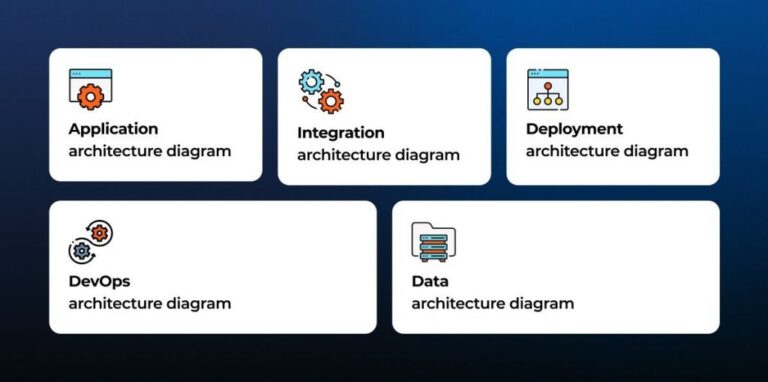
A technical diagram turns architecture from a conversation into something a team can point at and argue about productively. Not every diagram earns its place, though. Three carry most of the weight in day-to-day product work, and any technical architecture diagram is only useful if it answers a question someone actually has rather than decorating a slide. See what's possible with AI strategy consulting services.
Application architecture diagrams
A software architecture diagram, sometimes called an application architecture diagram, shows the structure of an application and how its components interact. It maps the modules, services, and the calls that run between them.
Product teams use it to see where logic lives and where responsibilities overlap. When a single feature touches five services, this diagram is what tells you which team owns which piece and where a change will ripple outward. It is also the fastest way to spot a component that has quietly grown into a dependency for half the product, which is usually the first thing to break under a rewrite.

Integration architecture diagrams
An integration diagram shows how separate systems connect and exchange data. It covers the APIs, message queues, and data flows that move information between your product and the tools around it. Learn more about our AI agent development services.
This is the diagram that surfaces hidden coupling. Two systems that look independent on paper often share a dependency that only becomes obvious once someone draws it. For products that plug into payment providers, CRMs, or internal services, the integration diagram is usually the first thing to open when something breaks across a boundary. It answers the question every incident review eventually asks: what talks to what, and through which contract.
Deployment architecture diagrams
A deployment diagram shows how software is placed across hardware and infrastructure. It maps which service runs on which host, how traffic reaches it, and where the environment boundaries sit.
This one answers operational questions. Where does the product scale, what happens during a region outage, which component is the single point of failure that nobody has budgeted to remove. Teams that skip the deployment diagram tend to learn its contents during an incident instead of before one, usually at the worst possible hour.
Two other diagram types come up in specific cases. DevOps diagrams document the build and release pipeline, and data architecture diagrams map how information is stored and moved through the product. Both are worth having when the situation calls for them, but the three above cover the majority of product decisions. Explore our AI process automation services.
What a technical architect actually owns
A technical architect owns the decisions that are hard to reverse. Naming conventions and code style can change in an afternoon. The boundary between two services, the choice of database, the way the product handles authentication and identity: those stay in place for years, so someone has to be accountable for getting them right.
The role shows up in a few forms depending on scope. An enterprise architecture specialist works at the strategy level, aligning technology architecture with business goals across an entire organization. An infrastructure architect focuses on the hardware, networks, and runtime that everything else sits on top of. A software architect designs the structure of individual products and the components inside them. On a single product team, one person often covers more than one of these roles at once, and the title matters less than the scope of decisions they hold.
The day-to-day work of the role includes:
- Defining how the system is divided into components and services, and where the boundaries between them fall
- Selecting technologies and justifying the trade-offs behind each choice, not just the choice itself
- Setting the standards that keep separate teams building in the same direction
- Reviewing designs before they get built, while changes are still cheap
- Owning technical decision-making when two reasonable options pull in different directions
That last item is the core of the job. Good technical decision-making has little to do with picking the newest tool on offer. It comes down to weighing cost, risk, the skill already on the team, and the shape the product needs to have a year out, then committing to a choice the rest of the team can build on with confidence. The architect is the person who has to defend that reasoning when someone questions it six months later, which is why the reasoning has to be written down and not just held in one head.
How Technical Architecture Supports Delivery Quality
Architecture is easy to treat as documentation that sits in a wiki and slowly ages out of date. In practice it is one of the strongest levers a team has over how fast and how safely it ships. Contact us for technology product consulting.
Scalability and reliability
Scalability problems are rarely sudden. They are usually a decision made early, at small scale, that stops holding once traffic grows past what anyone tested for. A clear technical architecture makes those limits visible while they are still cheap to change. When the data layer, the application logic, and the infrastructure are cleanly separated, a team can scale the one part under pressure instead of rebuilding the whole product to fix a bottleneck in a corner of it.
Reliability follows the same logic. A deployment diagram that names every single point of failure lets a team decide which ones are worth the cost of removing and which they can accept for now. Without that view, reliability work turns into guesswork after each outage, and the same failure tends to recur in a slightly different shape.
Team alignment and decision speed
The quieter benefit is speed. When the structure is written down and agreed on, engineers stop relitigating the same questions in every pull request. A shared technical diagram gives two teams the same mental picture, so a decision made in one corner of the product does not blindside the team working in another.
This is where architecture pays back the time it costs to maintain. Alignment is what lets a team move quickly without stepping on each other, and it comes from a structure people genuinely share, not from adding another sync meeting to the calendar. A product with clear architecture spends its meetings on new problems instead of rediscovering old ones. Explore our software product discovery services
How Altamira uses technical architecture in product selivery
At Altamira, architecture is not a document produced once and filed away. It runs through software delivery, technical audits, consulting, and engineering planning as a continuous part of the work.
On delivery projects, the structure gets set before the first sprint and revisited as the product changes, so scaling and integration decisions are made deliberately rather than under pressure in the middle of a release. During technical audits, an architecture review of an existing product surfaces the coupling, bottlenecks, and single points of failure that quietly slow a team down, then turns those findings into a prioritized list of fixes with real effort estimates attached. In consulting and engineering planning, solution architecture work connects a business goal to a concrete technical plan, with the diagrams and trade-offs documented so the client's own team can own the result after the engagement ends. Discover SaaS AI agent.
The through line is continuity. The same architectural thinking that shapes a new build is what keeps an existing product from drifting into the problems that brought the team looking for help in the first place.
How to know when a project needs architecture review
An architecture review is worth running before problems force one on you. A handful of signals tend to show up first, and any of them is a reason to look.
Delivery is slowing for no obvious reason. Features that used to take days now take weeks, and most of the extra time goes into working around the existing structure instead of building the feature itself.
Integrations keep breaking. A change in one system quietly breaks another, which almost always means the coupling between them was never made explicit. An integration diagram and a walk through the boundaries will usually find it fast.
Infrastructure costs are climbing faster than usage. When spend grows out of step with traffic, the architecture is often doing more work than it should just to hold together, and the bill is where that shows up first. Learn more about large language models.
Onboarding is slow. When new engineers take months to become productive because the real structure only lives in a few people's heads, the architecture technically exists but was never written down in a form anyone else can use.
New requirements no longer fit. When every roadmap item seems to fight the current design, the architecture was probably built for a product that no longer matches the one you are actually shipping.
Any one of these justifies scheduling a review. Two or more at the same time is a reason to run it now rather than next quarter. The review itself does not have to be heavy. A technical architect walking the current diagrams against the real product, naming the gaps out loud, and proposing a short list of concrete changes is usually enough to reset direction before the drift becomes a rebuild.
Conclusion
Technical architecture earns its keep by making expensive decisions visible before they harden into constraints. The teams that treat it as a living part of delivery, kept honest through regular architecture review, tend to move faster over the life of a product than the teams that document it once at kickoff and never look again.
A software architecture diagram, an integration diagram, and a deployment diagram are not deliverables that exist for their own sake. They are the shortest route to giving a product team a shared and honest picture of what they are building and where it will bend under load. Get that picture down early, keep it current as the product changes, and most of the problems that usually drag architecture into the conversation too late stop arriving as surprises. That is the whole return on the effort, and for most product teams it is more than enough to justify the work.
Frequently Asked Questions
What is high tech architecture?
In software, high tech architecture refers to a technology architecture built on current infrastructure and practices: cloud hosting, containerized services, automated build pipelines, and clean separation between application, data, and infrastructure layers. The standard industry term for the same idea is technical architecture, which defines how a product's components are structured, connected, and run in production.
What is tech architecture?
Tech architecture, short for technical or technology architecture, is the set of decisions about how a software product is structured: how it splits into components and services, how those parts exchange data, and how they run in production. It gives a team a shared plan for building and scaling the product without conflicting choices piling up along the way.
How to create a tech stack diagram?
Start by listing every technology the product uses, from the frontend down to the infrastructure and external services. Group them into layers: presentation, application, data, and infrastructure. Draw each layer as a band, place the relevant tools inside it, then connect the ones that exchange data. Keep the diagram in a shared location and update it whenever the stack changes. Tools like draw.io, Lucidchart, or Excalidraw handle this well.
What is a tech stack diagram?
A tech stack diagram is a visual map of every technology used to build and run a product, grouped by layer. It shows the frontend framework, backend language, database, infrastructure, and third-party services in one place, so a team can see what the product depends on and where those dependencies connect.